


uSERS Windows who never had problems with viruses, Trojania And others animated most likely they are an endangered species or, more plausibly, they haven't had more than a few hours (and it's already a long time) since they first met a computer. The rest of the users, who were visited at least twice by various types of malware (because even those visited once are still on the verge of extinction) I know how difficult it is to save a system after this one was virusat. Even if uninvited guests they are identified and "evacuated", most of the time leaving them behind affected registries and corrupt system files which can be a big headache. And since handling each of them is extremely painstaking and stressful, most of the time they opt for a Reinstalare de Windows.
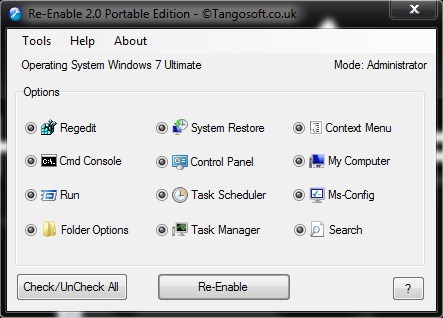
Re-Enable It's O Free application, also available in the form of installer and portable, with the help of which users whose systems are affected by virus pot reactivates most tools and vital functions for Windows:
- Windows Registry
- Command Line Tool
- Windows Task Manager
- System Restore Config
- Folder Options
- Run command
- My Computer
- Task Scheduler
- Right Click Context menu
- MsConfig (valid for XP only)
- Control Panel
- Search
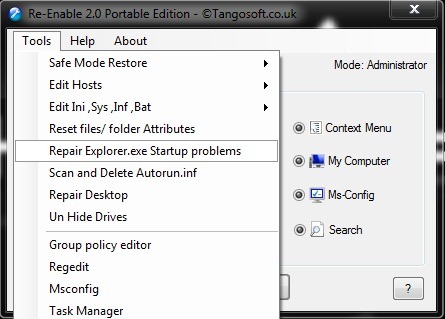
Also Re-Enable allows scan, edit and deleting Autorun.inf files, the modification protocol files, a hosts, a networking, a folder attributes SI and the status of system services; help to repair corrupted icons on the Desktop or its backgrounds; fix the problems of Startup a explorer.exe; show hidden partitions etc.
In conclusion, even if currently the new antivirus it didn't disappoint you or you learned to be more cautious, and your Windows doesn't "suffer" from any disease, it doesn't hurt to keep Re-Enable close by for any eventuality. It could save you from a forced reinstallation of the operating system and some lost time. ;)
Note: Re-Enable does not replace antivirus, antimalware scanner or anything else software of this kind. Before using this application to repair various corrupted/defective Windows components, make sure that you have identified the causes of the problems and that you have already cleaned the computer of the viruses that caused it to reanimate.


You may also be interested in...

2 thoughts on “Repair the systems affected by viruses with re-enable (Windows Only)”