

Social networks AS Twitter, MySpace or Facebook have grown a lot in popularity lately and are the main cause of yield decrease at work or reducing the time given by children for learning or other activities that are not related to COMPUTER. If you are among those who feel these consequences directly, then you most likely want to block access to these sites during work, school or study hours.
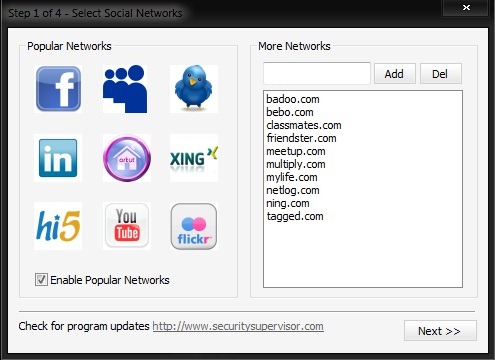
Internet Security Controller It's O Free utility which allows those affected by its social networks restrict access employees or students/children to them through computers at work or school. With the help of this program You can set a number of hours during which social networks will be restricted, you will be able to select the networks you want to block from a complete list of popular sites or you can add your own list of such social sites.
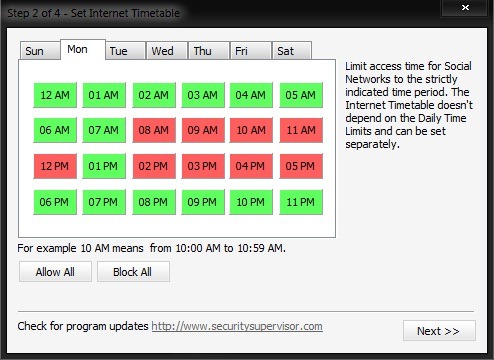
Internet Security Controller also offers you the option to set a time interval in which you allow access to social networks during restricted hours (for example during the lunch break). Security settings they can be done per day or per hour and creating a restriction interval is very simple to do, by marking the selected hours with red or green.
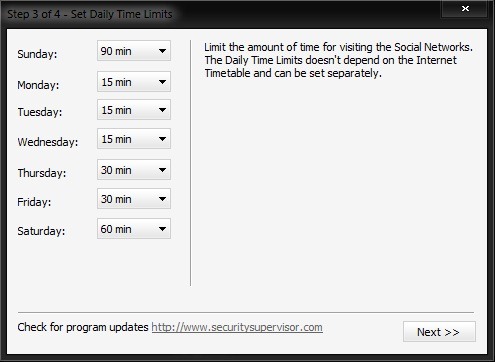
You also have the possibility to set a time limit limitt in which social networks can be accessed outside of restricted hours.
Once the restriction settings have been made, when someone tries to access the selected social networks, they will receive the following error message.
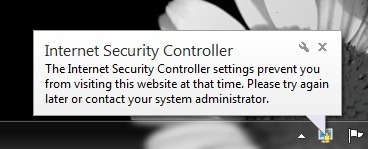
The settings made under Internet Security Controller are password protected, in this way not being allowed to modify them by other people.
Note: Application compatible with Windows XP, Windows Vista and Windows 7 (32 and 64 bits).
STEALTH SETTINGS – Restrict acces to social networks with Internet Security Controller


You may also be interested in...

2 thoughts on “Control access to social networks with Internet Security Controller”