


For various reasons (memory bad cpu "exhausted", the process blocked, configuration exceed etc) – or maybe just from one alone, called Windows (Even if in some cases it is followed by 7, it is still an Windows OS : D) - sometimes (or often in 50% of cases) applications which we run enters the "clinical death" - Not Responding – becoming non-responsive to any action that we take (in quite a few cases they recover after a relatively short-long-but how many are patient to wait for the applications to resuscitate themselves?) Except for a single one, namely that of that forced closure by completing the appropriate processes (Task Manager – End Task). But The blocked resources/processes make computer reaction speed difficult, and sometimes it takes more than a few seconds until we can finish those processes (default until Task Manager opens).
A simple way to avoid these little delays is creating a shortcut on the desktop to launch Non-Responsive applications.
How can we create a shortcut to finish the processes of non-responsive applications
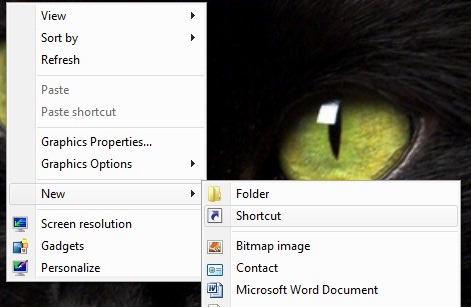
- First of all we will create an shortcut somewhat, click-right on a free area on Desktop and selecting from the menu New, then Shortcut
- in the field of below Type the location of the item (Create Shortcut Wizard) We type the order
taskkill.exe /f /fi “status eq not responding”
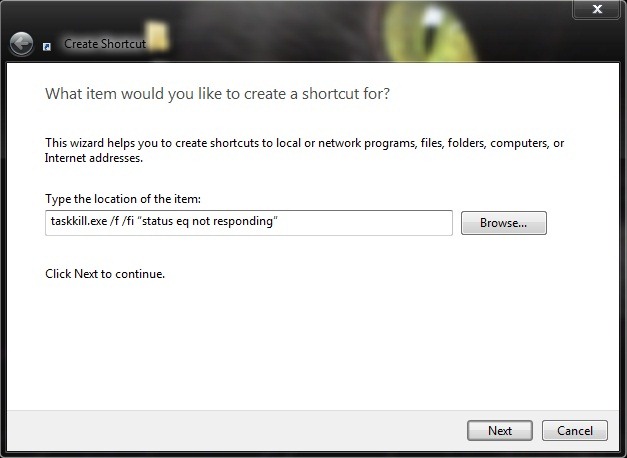
- Then I click on Next
- We call the shortcut as we chef (eg Appkiller, Terminator etc: P)
- click Finish

This way next time an application it will faint In our presence, we can call on services to this shortcut to remedy discreet The situation: D.
Note: Tested on Windows 7 and Windows Vista.


You may also be interested in...
