


Many users iPhone prefer to do jailbreak equipped devices to benefit from more Customization options and to have access to applications from Cydia. Unfortunately, once jailbroken, the only way to reset your iPhone the Factory settings is through hard reset, which obviously leads to jailbreak loss (users will have to jailbreak their devices again). Or at least that's what was thought until now, because there is still a fairly simple method with which users can reset iPhones without losing jailbreak done to them.
How do I reset the iPhone to factory settings without losing the jailbreak on it?
To reset the iPhone without losing the jailbreak, it is necessary to use the utility iLex Rat (command line tool):

- Launch Cydia Store and navigate to the tab Sources
- enter the mode Edit Then give tap on Add (top left corner) and type URL following:
http://cydia.myrepospace.com/iLEXiNFO/
- find the tool iLex Rat in the section Changes and install it
- then search Mobile Terminal in Cydia (Command Prompt for iOS), install it and launch it
- in Mobile Terminal typed rat and give tap on Enter
- this command will display 12 options which you will be able to use to reset your iPhone to factory settings (to execute a command type its number and give tap on Enter)
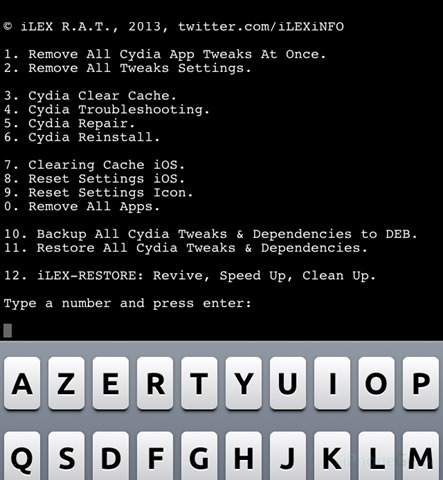
After executing the commands, Your iPhone will be restored to factory settings and will continue to have jailbreak-ul on him. Success!
STEALTH SETTINGS – How to reset iPhone without removing jailbreak


You may also be interested in...
