


When We accidentally delete a file or we realized late that I still needed it, we have a series of choice in order to recover the file respectively. Either we can restore the deleted files FROM backup-uri (if they are done regularly) or we can use various Software for Recovery, either, if we use Windows OS, we can restore the deleted files with System Restore or through feature Shadow Copy.
In the situation where the files we want to recover were deleted from Remote locations like a online storage service, users have the opportunity to recover them within 30 days from their deletion, or at least this is the case for the users Dropbox.
When we delete an Local File in Dropbox, it will also be deleted online (also, if the file is deleted online, it will also be deleted locally). But fortunately for those who occasionally accidentally delete files stored in Dropbox, the service keeps a copy of these files in recycle bin for a period of 30 days, from where users can recover them if needed (but only if the 30 days have not yet passed since the files were deleted!).
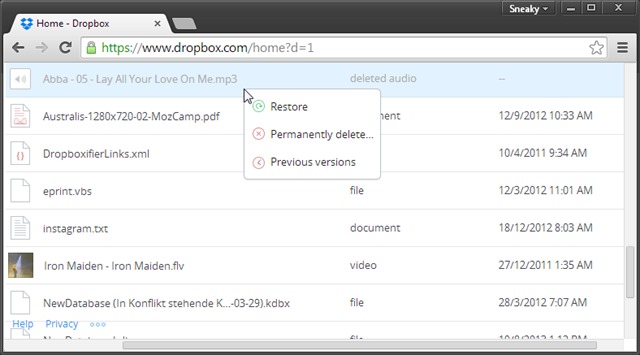
How can we recover accidentally deleted files from Dropbox?
- open site-ul Dropbox and log in with your account
- make sure files and share folders are displayed, then click on the icon recycle bin from the upper-right corner (next to Search)
- all will be listed here deleted files in the last 30 days
- identify the files you want to restore from among them, right-click on them and select Restore from the displayed menu (Dropbox will display a list of files selected for recovery, and you will have to click again Restore).
After the files are recovered online, they will be synchronize and local (if you have set this option).
If you want to permanently delete files from the recycle bin before the 30 days are up, select Permanently Delete from the right-click menu of the respective files.
STEALTH SETTINGS – How to restore deleted files from Dropbox


You may also be interested in...
