

Microsoft launched today the first update for the version Technical Preview of the following operating system Windows 10. Among the novelties brought by him are included Action Center (or Notification Center), Data Sense and Battery Saver, these being part of a series of features announced by Microsoft three weeks ago, but not implemented in the first version of Windows 10 Technical Preview, as well as the new program for distribution system updates.
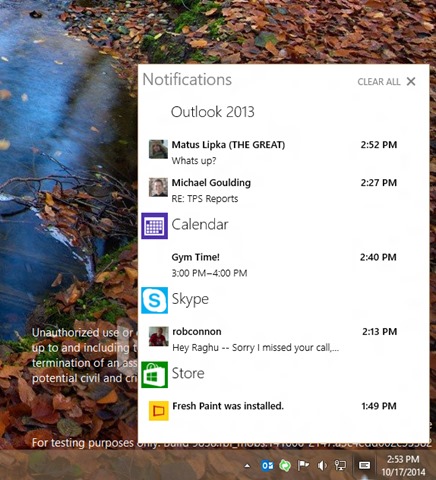
Action Center is a feature taken from the mobile operating system Windows Phone 8.1, whose basic property is the display in one place a posts sent by Modern applications and Desktop applications installed in the system. However, Microsoft stated that in the final version of Windows 10 the notification center will become more interactive and will have more advanced functions available.
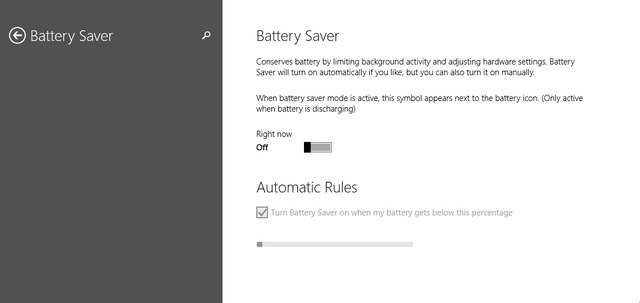
Data Sense, another feature initially found in Windows Phone 8.1, controls WiFi connections and 4G and offers new options of traffic management made by users, and Battery Saver limits running in background of applications and optimize energy consumption for a increase battery life running devices Windows 10 (currently these features are only implemented as previews, considering that the Technical Preview version of Windows 10 is intended only for PCs).
In terms of distribution of system updates in Windows 10, the new Technical Preview version includes an option with which users can set how quickly they can access the new system builds (this way users can postpone installation them until they are informed about the eventualities fall which can be caused by the respective builds).
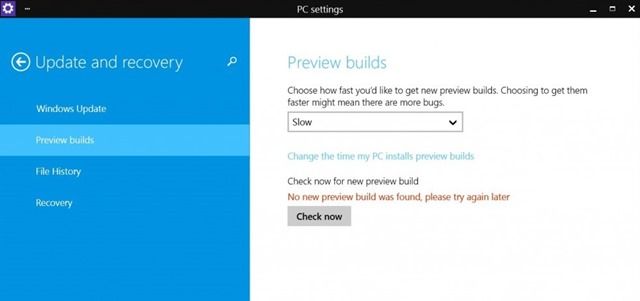
Update-ul launched today for Windows 10 Technical Preview has the code number 9860 And it can be INSTALLED through Windows Update, or it can be downloaded manually through the section Update and recovery > Preview builds FROM PC Settings.
STEALTH SETTINGS – Microsoft released its first update for Windows 10 Technical Preview


You may also be interested in...
