


En la cima del Yahoo! Mensajero ventana se esconde una parte de la interfaz que a menudo se pasa por alto, pero que es útil: el barra de búsqueda de contactos. Con un nombre acertado, te permite encontrar rápidamente un amigo en tu lista de contactos e iniciar una conversación con él, ya sea que haya terminado. SOY, correo electrónico, SMS o voz. E incluso si alguien no está en tu lista de contactos o libreta de direcciones, puedes simplemente ingresar un Yahoo! DNI, número de teléfono o correo electrónico para empezar.
Usando el Barra de búsqueda de contactos en Yahoo! Mensajero
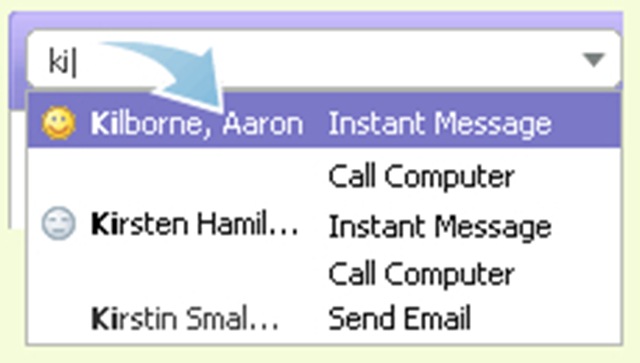
1. Comience a escribir un par de caracteres en la barra de búsqueda de contactos y debajo aparecerá una lista de nombres, identificaciones y números de teléfono coincidentes.
2. Utilice las teclas de flecha o el mouse para resaltar un contacto y presione la tecla Intro.
Leer más : Conozca la barra de búsqueda de contactos


También te puede interesar...

3 pensamientos sobre “Búsqueda de contactos / Yahoo! Mensajero”