


ülaosas Yahoo! Käskjalg aken varitseb sageli tähelepanuta jäetud, kuid käepärast osa liidest: the kontaktide otsinguriba. Sobiva nimega see võimaldab teil kiiresti leida oma kontaktiloendist sõbra ja alustada temaga vestlust, olenemata sellest, kas see on lõppenud Im, e -kiri, SMS või hääl. Ja isegi kui kedagi pole teie kontaktide loendis või aadressiraamatus, saate lihtsalt sisestada Yahoo! Alustamiseks ID, telefoninumber või e-posti aadress.
Kasutades Kontaktide otsinguriba sisse Yahoo! Käskjalg
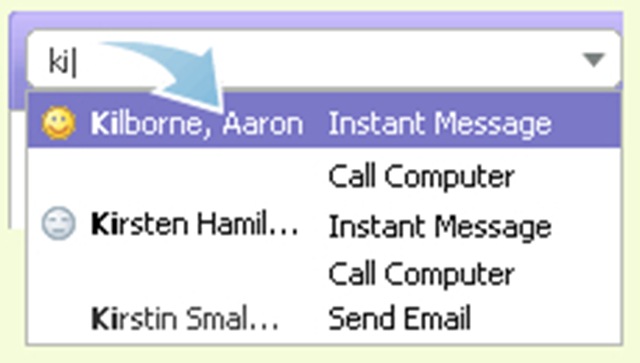
1. Alustage paari tähemärgi tippimist kontaktiotsingu ribale ja allpool kuvatakse vastavate nimede, ID-de ja telefoninumbrite loend.
2. Kasutage kontakti esiletõstmiseks nooleklahve või hiirt ja vajutage sisestusklahvi.
Loe lähemalt: Tutvuge kontaktide otsinguribaga


Samuti võite olla huvitatud...

3 mõtet “Kontaktide otsing / Yahoo! Sõnumitooja”