


At the top of the Yahoo!メッセンジャー window lurks an often overlooked, but handy piece of the interface: the contact search bar. Aptly named, it lets you quickly find a friend in your contact list and start a conversation with them, whether it’s over 私は、 メール、 SMS または voice. And even if someone’s not in your contact list or address book, you can just enter a Yahoo! ID, phone number or email to get started.
Using the Contact Search Bar の上 Yahoo!メッセンジャー
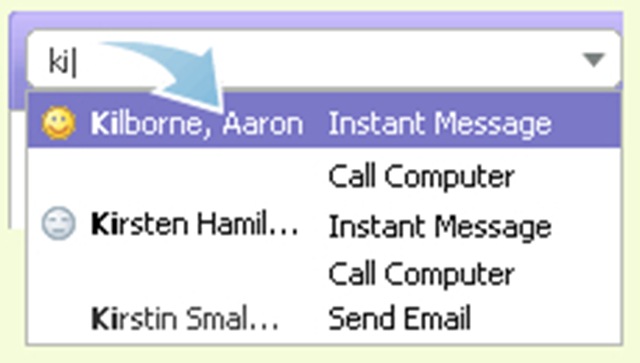
1. Start typing a couple characters into the Contact Search Bar, and a list of matching names, IDs, and phone numbers will appear below.
2. Use the arrow keys or the mouse to highlight a contact, and press the Enter key.
Read more : Get to know the contact search bar


あなたも興味があるかもしれません...

roundcube / vestacpにないWebメールファイル[修正]
サーバー上のパッケージ更新後に発生する Roundcube の Webmail ファイルが見つからないエラーの解決策。 /webmail アドレスは ...
Macのインターネットに接続するアプリケーションをどのように確認しますか?
macOS でインターネットに接続するアプリケーションを知る必要があるシナリオがあります。次のようなアプリケーションを探したいかどうか...
POP3とIMAPの違いは何ですか?しかし、smtp?
POP3 と IMAP の違いを理解するには、まず、次のサービスについて、それぞれが何を意味するかを確認します。
Prestigio Multipad Consul 7008 4G、8インチコンパクトディスプレイタブレット
大手メーカーの Prestigio は、ビジネスセグメント向けの製品群から新しい手頃な価格のタブレット、新しい MultiPad Consu...
ヤフー!ジオシティーズは閉店します … ヤフー! Meme が一般公開されました
Yahoo!、彼らはすごいです。近年、いくつかの重要なサービス (Yahoo! Mash - ベータ段階から閉鎖) を閉鎖した後、Yahoo! ...
ヤフー! Apple でメッセンジャーがスタンバイ…
...そして、Yahoo! からのものです。 Yahoo! は幸運であると考えることができます。 iPhone 用メッセンジャーは拒否されませんでした (少なくとも ...
LAN ネットワーク カードの Mac を変更するにはどうすればよいですか (Windows 7、Vista) & WindowsXP)
ネットワーク カードの Mac (物理アドレス) を変更することはお勧めできませんが、変更する必要がある場合は、続きを読んでください。
Yahoo!でメールが届かない場合の対処法メールクラシック。
皆さんの多くは、受信トレイに大量のメッセージが届くことをもう望んでいないことと思います。ここで話しているのはスパムではなく、実際のメールです。多くの...
メールアドレスにすばやくアクセスするためのショートカット
友人やビジネスパートナーとの連絡手段として電子メールを使用する人にとっては便利なものです。ほとんどの...
Yahoo IDリスト交換!メッセンジャー、女の子、男の子。
私のyahooメッセンジャーのIDが、hi5のようなyahooメッセンジャーのリスト交換に特化したサイトに間違って入ってしまったのだと思います…。
Googleでより効率的に見るためのいくつかのヒント
単語のグループまたは正確なフレーズ: yahoo メッセンジャーのスキンに関するコンテンツを探しているとします。ただ「y」と入力するのではなく...
Gトーク vs.ヤフー!メッセンジャー8.1
最近はヤフー!メッセンジャー、Googleトークだけを使う時代が来たと確信しました。
Y!M を諦めるべき 3 つの理由
についての 3 つの考え “連絡先検索 / Yahoo!メッセンジャー”