


På toppen av Yahoo! Bud vindu lurer en ofte oversett, men hendig del av grensesnittet: kontaktsøkefeltet. Det passende navnet lar deg raskt finne en venn i kontaktlisten din og starte en samtale med vedkommende, enten den er over IM, e-post, SMS eller stemme. Og selv om noen ikke er i kontaktlisten eller adresseboken din, kan du bare skrive inn en Yahoo! ID, telefonnummer eller e-post for å komme i gang.
Ved å bruke Kontakt søkefeltet på Yahoo! Bud
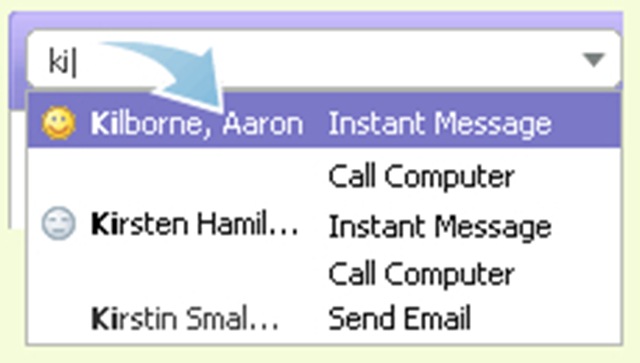
1. Begynn å skrive et par tegn i kontaktsøkefeltet, og en liste over samsvarende navn, IDer og telefonnumre vises nedenfor.
2. Bruk piltastene eller musen til å markere en kontakt, og trykk på Enter-tasten.
Les mer: Bli kjent med kontaktsøkefeltet


Du kan også være interessert i...

Webmail -fil ikke funnet i Roundcube / Vestacp [Fix]
En løsning for Webmail File Not Found-feilen i Roundcube som dukket opp etter en pakkeoppdatering på serveren. /webmail-adressen er...
Hvordan ser vi applikasjonene som kobles til Internett på Mac?
Det er scenarier der vi trenger å vite applikasjonene som kobler til Internett på macOS. Enten vi ønsker å finne en applikasjon som...
Hva er forskjellene mellom POP3 og IMAP? Hva med SMTP?
For å forstå forskjellene mellom POP3 og IMAP, vil du først oppdage hva hver betyr separat, for en tjeneste av ...
Prestigio Multipad Consul 7008 4G, 8 -tommers kompakt display -nettbrett
Den store produsenten Prestigio annonserte lanseringen av et nytt rimelig nettbrett fra serien beregnet på forretningssegmentet, den nye MultiPad Consu...
Yahoo! GeoCities stenger … Yahoo! Meme er nå åpent for offentligheten
Yahoo!, de er utrolige. Etter at de stengte flere viktige tjenester de siste årene (Yahoo! Mash - stengt siden betafasen, Yahoo! ...
Yahoo! Messenger pus i standby av Apple…
... og de fra Yahoo! kan betrakte seg som heldige, fordi Yahoo! Messenger for iPhone ble ikke avvist (minst ...
Hvordan kan du endre Mac-en til et LAN-nettverkskort (Windows 7, Vista & Windows XP)
Det er ikke akkurat tilrådelig å endre Mac (fysisk adresse) til et nettverkskort, men hvis du må gjøre det, les i forts...
Hvordan ikke motta e -postmeldinger på Yahoo! Mail Classic.
Jeg vet at mange av dere ikke lenger ønsker å bli overfalt av dusinvis av meldinger i innboksen. Jeg snakker om ekte e-poster her, ikke spam. Mye...
Snarveier for rask tilgang til e-postadresser
Det er nyttig for de som bruker e-post som kommunikasjonsmiddel med venner eller forretningspartnere. De fleste s...
Utveksling av lister Yahoo! Messenger, jenter og gutter.
Jeg tror at yahoo messenger-ID-en min ved en feil havnet på nettsteder spesialiserte på yahoo messenger-listeutvekslinger, som hi5....
Noen tips for å søke mer effektivt på Google
Grupper av ord eller eksakte setninger: La oss si at vi ser etter innhold om yahoo messenger-skinn. I stedet for å bare skrive...
Gtalk Vs. Yahoo! Messenger 8.1
Den siste tiden Yahoo! Messenger, overbeviste meg om at tiden er inne for å bare bruke Google Talk.
Tre grunner til å gi opp Y!M i ...
3 tanker om “Kontaktsøk / Yahoo! Bud”