


Those who opened their account Gmail today they probably saw the message “A new look for Gmail” and they became aware of the new changes of Gmail.
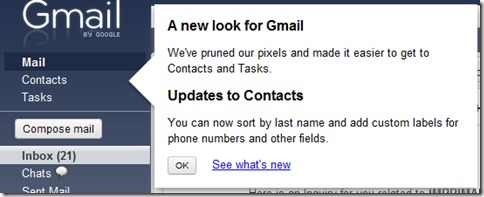
Link-ul “Compose mail” was transformed into a button (much more visible than the link”, again “Contacts” and “Tasks” have been moved to the upper part of the sidebar, before the button “Compose” and “Inbox“.
Apart from these changes visible from the first page after logging in, Gmail has undergone important changes in the management of contacts.
Updates to Contacts
We’ve also done a major overhaul to Contacts, adding a bunch of features you requested and making Contacts easier to use.
- Contacts work a lot more like Mail. Keyboard shortcuts now work in Contacts too, and we’ve made selecting and grouping contacts more like selecting and labeling email.
- Sort contacts by last name. Look underMore actions for this option.
- Use custom labels for phone numbers and other fields. For example, you can label a phone number as “Vacation home.” Please be aware, ActiveSync for iPhone and Blackberry Sync don’t yet support custom labels so custom labeled numbers/emails/etc. may not appear on your phone.
- Undo. Now, when you make changes to your contacts, you can undo your recent changes.
- Automatic saving. You no longer need to worry about “edit” mode or “view” mode — just edit away and Gmail will save your changes.
- Structured name fields. You can now set name components (i.e. Title, First, Middle, Last and Suffix) explicitly or continue to use the name field as a free form area if you prefer a less structured approach.
- Manual and bulk contact merge. You can now merge contacts from theMore actionsmenu. Just select the contacts you’d like to merge and selectMerge contacts from under theMore actions menu. Or, to get a list of suggestions for contacts to merge, selectFind and merge duplicates.
Overview of what’s new in Gmail
You can find out more news about Gmail on the official blog: gmailblog.blogspot.com.


You may also be interested in...

2 thoughts on “New changes to the Gmail account – A new look for Gmail.”