


A rather disturbing piece of information appeared on Twitter the other day, according to which the autofill in Chrome and Safari can provide hackers with very sensitive information, such as the name, email address, postal address, phone number and credit / debit card data of users who use this option.
content
What is autophilic?– The option which stores personal and credit card data in the browser, to be filled in automatically in the specific fields when we need to make a payment or a bank transfer.
An option that saves us from entering personal data on websites, but as shown in an article in The Guardian, it is also a very dangerous option.
renowned hacker Viljami Kuosmanen, it looks like through certain exploit placed on dubious websites, credit card data can be entered automatically in invisible fields. Thus, without realizing it, the user sends confidential information to someone with bad intentions.
In a Google press release, a representative of the company announced that Google is currently working on solving this problem in the Chrome Internet browser.
A simple solution would be to stop using this option disable AutoFill in Safari and Google Chrome.
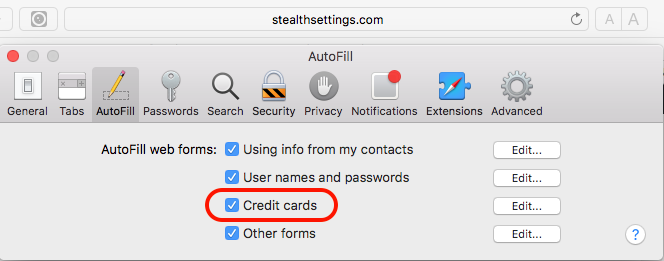
Disable AutoFill for Credit Card in Safari – macOS
Safari > Preferences… > in tab-ul AutoFill uncheck the option “Credit Card“.
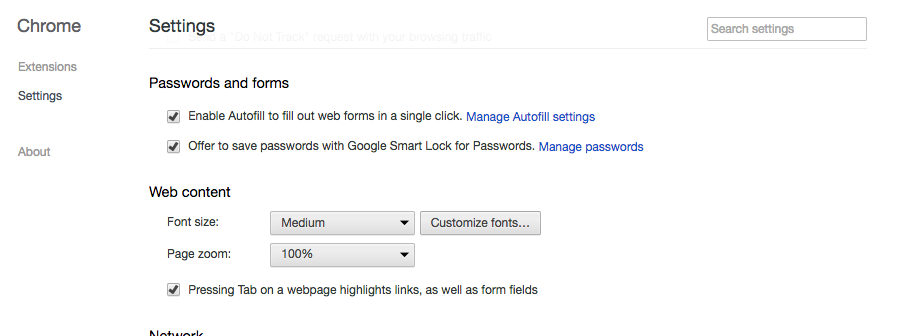
Disable AutoFill in Google Chrome
In Google Chrome, it is enough to access:chrome://settings/ then go to “Settings”, and under “Passwords and forms” to uncheck the option “Enable Autofill to fill out web forms in a single click“.
Browser-ul Mozilla Firefox does not store sensitive data by default.


You may also be interested in...
