

Even if it is considered to be the most stable mobile operating system, sometimes and IOS still misses, such as LOCK while running some Applications. If you are also in such a situation, when the system no longer responds to commands and blocks the application you are running (or rather, the application you are running on iOS no longer responds to commands and blocks the operating system), you can easily solve the problem by following the instructions below.
How to forcefully close the applications running on the iPhone or iPad
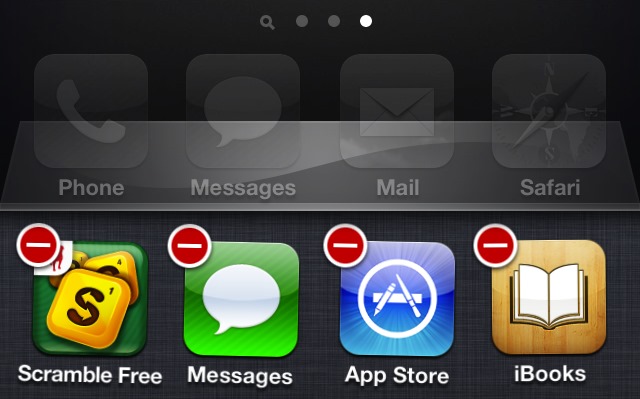
- when the application you run on iPhone or iPad it no longer responds to commands and blocks the system, press the button repeatedly Home, until displayed the application switcher (at the bottom of the screen)
- identified application blocked and hold your finger on its icon
- Then give tap on minus sign located in the upper-left corner of the application icon.
And ready. This way you can force close applications that block the system operating mobile iOS.
STEALTH SETTINGS – How to force-close blocked applications on iPhone or iPad


You may also be interested in...

How can we completely disable the self-body function on an iPhone device
If you are an iPhone user (or an iOS device) and you have activated the auto-correct function on it, you have most likely had...
How can we reduce the brightness of an iPhone display below the limit without jailbreak
In some situations, the brightness of the screen of an iOS device can be irritating to the eyes (especially at night), even if it is...
How can we set the iOS keyboard to change its color according to the light application
Compared to other mobile platforms (for example Android), iOS does not give users the possibility to use custom keyboards, nor to ...
How we can restore Home Screen for iPhone and iPad to Default appearance
When we install applications on an iPhone or iPad, they place icons for each (with few exceptions) on the home screen available...
iOS 7 pentru iPhone 2G, iPhone 3G, iPod touch 1G si 2G
If you own older Apple mobile devices, such as the iPhone 2G, iPhone 3G, iPod touch 1G and iPod touch 2G, we have a v...
Modify the country or region of the Apple iOS account
It may happen that you discover an iOS application online that you want to download and install in your device (iPhone, iPa...
Apply live voice effects during the phone calls on iPhone with Voicechager
Although it's been a few weeks since Halloween, it's never too late to play a trick on your friends. One idea would be to use...
How can we disable information about the locations in the photos taken with the iPhone
Most iPhone users, when setting up the device for the first time, also activate the Location Service for the Camera...
FA Password from IPhone Hard to Guess with Codescrambler
When it comes to the security of data and information stored on the phones (smartphones and tablets) provided, the...
How can we see passwords for Wi-Fi networks in iPhone
When we use several Wi-Fi networks (from different locations) to connect to the Internet from the supplied iPhone, the most...
Microsoft has launched the office suite for iPhone
Good news for iPhone users: Microsoft has finally released Office Mobile for Office 365, and it can be downloaded now...
How can we upload pictures from iPhone to Flickr without the help of any mobile application
After the update made a few weeks ago, Flickr has become the largest online photo and video storage service, offering...