


A very simple option for those who want to give up their account Yahoo! Mail, or for those who find it easier to read emails in Gmail than in Yahoo!.
option Accounts and Import from Gmail, allows us to We receive si sa ne We transfer on the Gmail account the messages received in other email accounts. The ones that came on live.com, msn.com, yahoo.com, aol.com or on a mail server with Pop3, can be transferred to the Gmail account. Both old messages and those to be received.
Here are the steps to be followed to do this message import.
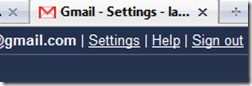
1. Log in to your account Gmail, then click on the Settings link (top-right corner)
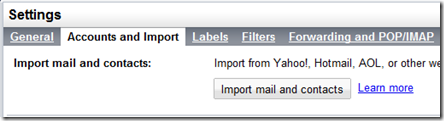
2. Arrived in “Settings“, click on Account and Import, then on the button “Import mail and contacts“.
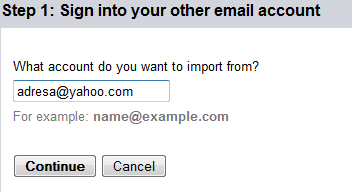
3. In the window that opens, enter the address of your e-mail account from which you want to import the messages and contacts. Click “Continue”.
4. Enter account password from which the import is to be made. In the above case, the password of the Yahoo! account. Click “Continue”.
5. After entering the password, you can select what you want to import. You can choose to import only the emails to be received in the next 30 days, contacts or messages.
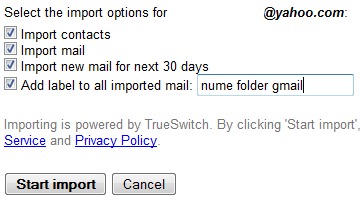
Click pe “Start import“.
The import process can take from a few minutes to several tens of hours. Even two days, as the people from Google tell us.
Your messages are being imported.
It may take several hours (sometimes up to 2 days) before you start to see imported messages.
You can close this window and keep using Gmail or even log out and close your browser – we’ll continue importing your mail and/or contacts in the background. To check the status of your import, look under Settings > Accounts and Import.
Through this method you can benefit from an option that Yahoo! it is only offered to Mail Plus customers. The option to download in Microsoft Outlook the messages received in Yahoo! Mail. It is enough to set up your Gmail account in Outlook, and the messages that will be imported from Yahoo!, will be downloaded automatically.


You may also be interested in...

6 thoughts on “How to transfer / receive the emails from Yahoo! In Gmail (Import Yahoo!, Hotmail, AOL & POP3 in Gmail)”