
Skip to navigation Skip to main content
Stealth Settings
Menu
Stealth Settings
  • Home
  • Windows
  • macOS
  • Linux
  • Office
  • WordPress
  • AI
May 10, 2021 On May 1, 2014

by

Posted by stealth
0

Facebook introduces anonymous logging to protect the personal information of the users

Facebook, Internet, Net Surfing, Noteworthy, Tech News, Tutorials and IT news

Facebook introduces anonymous logging to protect the personal information of the users

Posted by author-avatar stealth
May 10, 2021 On May 1, 2014
0

Probably one of the ads that most users Facebook They didn't know how much they were waiting for it was made yesterday by the founder social network, Mark Zuckerberg, and name that soon it will be able to use Anonymous logging to visit Sites and use various Applications, without these having access to information that users want to keep private. What does this mean exactly?
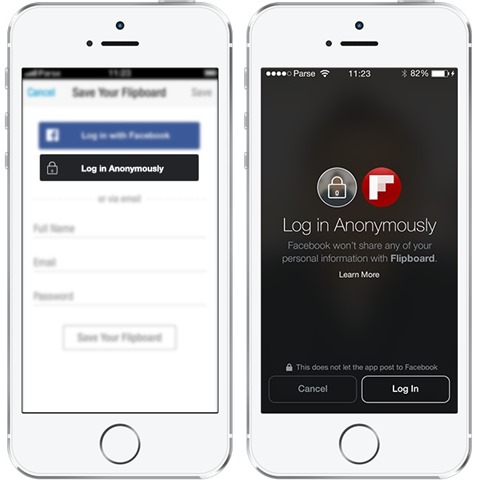
Anonymous-Login-Facebook

Some likely might think that the option of Anonymous logging will give them the opportunity to log on to Facebook in Anonymous way. Totally wrong. Anonymous logging but will give them the opportunity to log on to different Sites who ask either creating an account, either the use of a cont Facebook to have access to information Available on those sites (or to be able to interact with other users). Opting for Anonymous logging made available by Facebook, users will be able to restrict access third parties to personal information such as NAMEs, profile picture, birthday, list of contacts etc.

The same thing is true for applications used by users Facebook, they could now have control on volume of information pe care il primesc respectivele aplicatii despre ei. In plus, Applications will no longer be able to post updates on users' timelines without their permission.
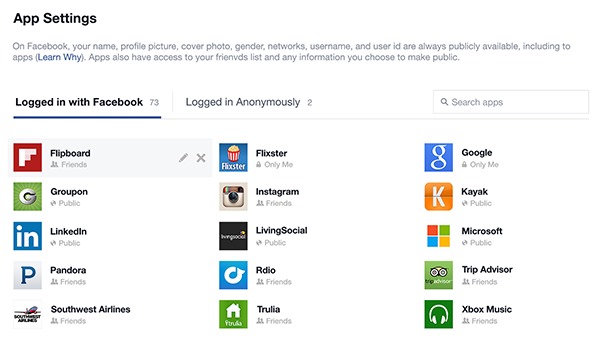
anonymous-login-apps

However, Facebook users need to know that using Anonymous logging To log on to various sites and applications will not help them to be totally anonymous; The use of these services will not be anonymous for Facebook at all, for each user, registering exactly the applications and sites that have been logged in anonymously (which will make this information worth much more for advertisers who want to target certain groups of users in function of the interests acestora). Mai exact, chiar daca site-urile si aplicatiile pentru care veti folosi logarea anonima nu vor putea avea acces la informatiile dvs ca utilizator Facebook, Facebook goes sti exactly what are each of the sites and applications you will logo anonymous.

STEALTH SETTINGS – Facebook to introduce anonymous login to protect users personal data

Facebook introduces anonymous logging to protect the personal information of the users

What’s New

  • Enable preview of PDF, Excel, or Word files in Windows 11 - (Preview Pane)
    Enable preview for PDF, Excel, or Word files in Windows 11 – (Preview Pane)
    December 24, 2025
  • Windows 11 Build 27823 - Top Cards
    What's new in Windows 11 Build 27823. Top Cards.
    March 27, 2025
  • Google Analytics
    How to remove _gl and _ga parameters from a website's URLs.
    March 25, 2025
  • Google Core Update SEO - March 2025
    Sudden drop in organic traffic on the site in March 2025? Google Search Core Update
    March 23, 2025
  • How to configure Fail2Ban for WordPress (wp-login, xmlrpc)
    How to configure Fail2Ban for WordPress (wp-login, xmlrpc)
    March 17, 2025
  • GPT-4.5
    What's new in GPT-4.5? The most powerful ChatGPT model.
    March 2, 2025
Facebook featuresFacebook newsFacebook PrivacyFacebook Tutorials & TipsLog in using Facebook
Facebook, Internet, Net Surfing, Noteworthy, Tech News, Tutorials and IT news
Newer
How can we view the updates on Facebook in chronolygic order
Back to list
Older Changed interface and new customization options for Firefox 29
author-avatar

About stealth

Passionate about technology, I like to test and write tutorials about Windows operating systems, seeking to discover interesting things.

View all posts by stealth

You may also be interested in...

03 Apr

How to turn off the specific sounds of the Facebook application

One of the somewhat uninspired decisions of the Facebook company, recently, was to introduce sounds in the application in principle...
Continue reading
07 Feb

How can we disable Facebook mail account

Many Facebook users do not know that, once the Facebook profile is created, a Facebook email address is also created by default...
Continue reading
31 Jan

How can we disable Timeline in Facebook (browser extensions)

Launched three years ago, at the end of 2011, the Timeline interface of the Facebook social network was not received with much interest...
Continue reading
26 Dec

How can we block invitations for games or applications in facebook

I don't think there is even a single Facebook user who is not irritated by some feature or various activities that happen on ...
Continue reading
14 Dec

How can we block SEEN notification in Facebook Chat/Messages

One of the Facebook features that users of this social network love and hate in equal measure is the notification...
Continue reading
19 Sep

Enlarges the pictures on facebook only by passing with the mouse over them with Photo Zoom

Many times, when we are on Facebook, we notice from comments or status updates that certain friends...
Continue reading
07 Sep

How can we rearrange the order of uploaded photos in the Facebook account

When we upload several photos at the same time on Facebook, they are arranged by default by name. Once u...
Continue reading
24 Aug

How can we give unhide in facebook news feed to previously hidden contacts

One of the Facebook features that many users are grateful for is the option to hide personal updates...
Continue reading
16 Aug

How can we hide your Facebook friends list

For Facebook users, protecting privacy has always been a priority, which is why Facebook updates every...
Continue reading
20 Jul

How can we delete or hide the history of personal Facebook account

In recent years, Facebook users have started to realize more and more how important privacy settings are...
Continue reading
14 Jul

How can we rearrange the order of tabs and sections in the sidebar in Facebook Timeline

A very useful tutorial in which we see in detail how we can rearrange the order of tabs and sections in the sidebar in Facebook Timeline...
Continue reading
27 May

Facebook will improve your privacy settings for new users

When a new user creates an account on Facebook, the default visibility settings for his posts are public, those...
Continue reading

Leave a Reply Cancel reply

Your email address will not be published. Required fields are marked *

© 2025 Stealth SettingsTutorials and news from information technology.
RomânăEnglishFrançaisDeutschItalianoEspañolPortuguês日本語한국어Lietuvių kalbaNorskNederlandsPolskiDanskSuomiEesti keelLatviešu valodaБългарскиУкраїнськаSvenskaČeština
Privacy policy | About cookies | Contact | About us
  • Home
  • Windows
  • macOS
  • Linux
  • Office
  • WordPress
  • AI