

Certainly everyone PC users-I know which one is the importance of creating backups but important data stored on systems provided. But even when you have all the backups made up to date does not mean that you are totally exempt from risks considering that HDDs They also have the unpleasant habit to "crack" when your world is dearer.
Windows 7 Mirroring* - a feature of the system with the same name - has the ability to Active "mirror" drives (implementation Raid1) – I mean two or more Harddisk-uri containing the same data/information is constantly synchronized, so if an HDD deserts, no file will be lost.
Notes: In order to activate Drive Mirroring you must have installed on the system at least two HDDs, one of which will be unclean! Also, the Unsolocated HDD-the CARD will have the role of mirror, must be equal in volume (or larger) with the one that will be "mirrored".
Cum putem activa Windows 7 Mirroring
- First of all, open Disk Management/Computer Management (taste diskmgmt.msc in Searchthe from Start Menu or click-right click on My Computer->Manage->Storage->Disk Management).
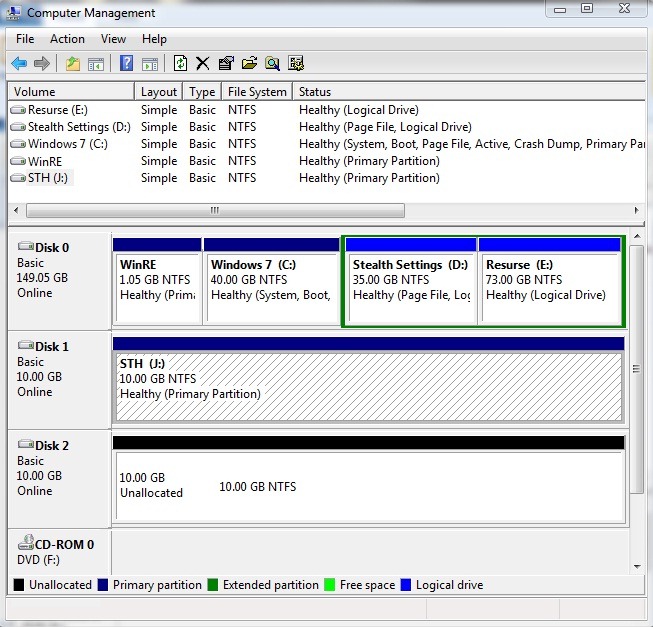
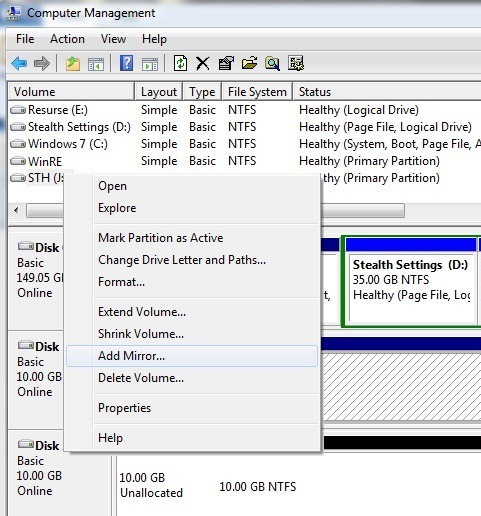
- To create the hdd "mirror", Click-right on the HDD you want to "mirror" and select Add Mirror from the displayed menu
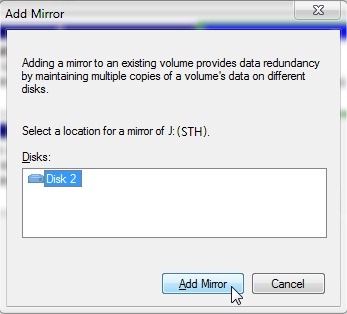
- Select the unallocated disk and click on Add Mirror
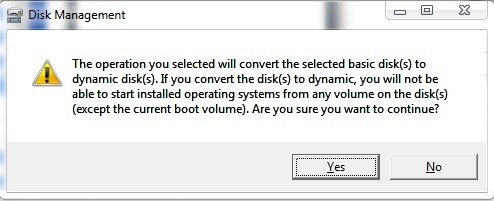
- Will be displayed a message that warns you that this action will change the HDD that will be mirrored from basic in dynamic (No information will be erased from HDD, so be worry -free). Click on Yes.
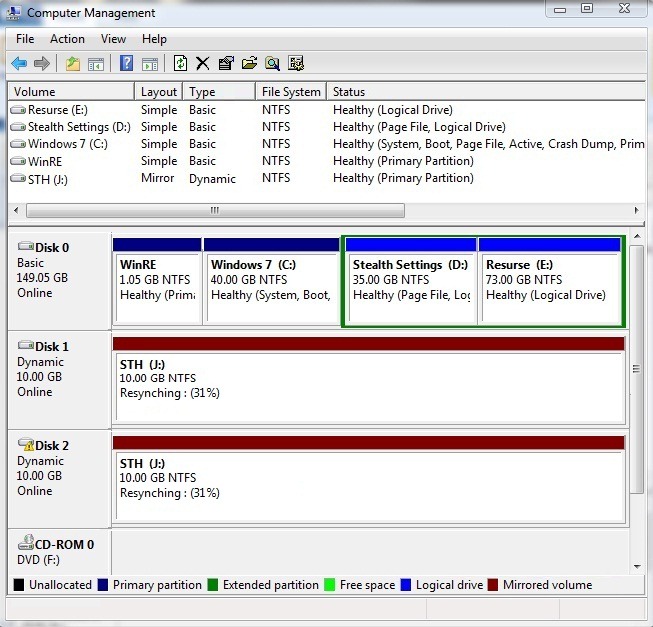
- The unclear HDD will be marked as mirror, and the data on the HDD mirror They will be copied to it (it will take some time until the two HDDs are synchronized).
Notes: Windows Mirroring is not a traditional back-up method, considering that if you delete a file from the mirror HDD, it will also be deleted from the mirror HDD. Also, this method is a problematic one for users using Dual-Boot, due to the conversion of the HDD from the dynamic basic. Even if you use Windows Mirroring for the backup of important data on the system, we recommend you to perform a normal back-up (on external HDDs).
*Windows 7 Mirroring is only available on Windows 7 Professional, Windows 7 Ultimate and Windows 7 Enterprise.


You may also be interested in...

One thought on “Protect your important data from your computer using Drive Mirroring [Windows 7 Feature]”