


さまざまな理由により、ユーザーを登録したメール アドレスにアクセスできなくなる重大な瞬間もあります。 ワードプレス管理者、データベースへのアクセス資格情報がもう分からず、管理ユーザーのパスワードさえ覚えていません。このシナリオでは、WordPress 管理者ユーザーのパスワードをリセットする方法を解決する必要があります。 WordPress 管理者のパスワードをリセットします。
コンテンツ
以下の方法により、 WordPress ユーザーのパスワードをリセットする 管理者パスワードを回復したい WordPress ブログまたはサイトがインストールされているルート フォルダーにファイルを作成するには、FTP またはファイル マネージャー (cPanel 経由) にアクセスする必要があります。
電子メールまたはデータベースにアクセスできない場合に、WordPress 管理者ユーザーのパスワードをリセットする方法
WordPress管理者のパスワードをリセットします
1. WordPress ホストサーバーのルートフォルダー (public_html) PHP ファイル (reset_password.php例)、以下のコードを追加します。
<?php
/*
	This program is free software; you can redistribute it and/or modify
    	it under the terms of the GNU General Public License as published by
    	the Free Software Foundation; either version 2 of the License, or
    	(at your option) any later version.

	This program is distributed in the hope that it will be useful,
    	but WITHOUT ANY WARRANTY; without even the implied warranty of
    	MERCHANTABILITY or FITNESS FOR A PARTICULAR PURPOSE.  See the
    	GNU General Public License for more details.

	You should have received a copy of the GNU General Public License
    	along with this program; if not, write to the Free Software
    	Foundation, Inc., 59 Temple Place, Suite 330, Boston, MA  02111-1307  USA
*/

require './wp-blog-header.php';

function meh() {
	global $wpdb;

	if ( isset( $_POST['update'] ) ) {
		$user_login = ( empty( $_POST['e-name'] ) ? '' : sanitize_user( $_POST['e-name'] ) );
		$user_pass  = ( empty( $_POST[ 'e-pass' ] ) ? '' : $_POST['e-pass'] );
		$answer = ( empty( $user_login ) ? '<div id="message" class="updated fade"><p><strong>The user name field is empty.</strong></p></div>' : '' );
		$answer .= ( empty( $user_pass ) ? '<div id="message" class="updated fade"><p><strong>The password field is empty.</strong></p></div>' : '' );
		if ( $user_login != $wpdb->get_var( "SELECT user_login FROM $wpdb->users WHERE ID = '1' LIMIT 1" ) ) {
			$answer .="<div id='message' class='updated fade'><p><strong>That is not the correct administrator username.</strong></p></div>";
		}
		if ( empty( $answer ) ) {
			$wpdb->query( "UPDATE $wpdb->users SET user_pass = MD5('$user_pass'), user_activation_key = '' WHERE user_login = '$user_login'" );
			$plaintext_pass = $user_pass;
			$message = __( 'Someone, hopefully you, has reset the Administrator password for your WordPress blog. Details follow:' ). "\r\n";
			$message  .= sprintf( __( 'Username: %s' ), $user_login ) . "\r\n";
			$message .= sprintf( __( 'Password: %s' ), $plaintext_pass ) . "\r\n";
			@wp_mail( get_option( 'admin_email' ), sprintf( __( '[%s] Your WordPress administrator password has been changed!' ), get_option( 'blogname' ) ), $message );
			$answer="<div id='message' class='updated fade'><p><strong>Your password has been successfully changed</strong></p><p><strong>An e-mail with this information has been dispatched to the WordPress blog administrator</strong></p><p><strong>You should now delete this file off your server. DO NOT LEAVE IT UP FOR SOMEONE ELSE TO FIND!</strong></p></div>";
		}
	}

	return empty( $answer ) ? false : $answer;
}

$answer = meh();
?>
<!DOCTYPE html PUBLIC "-//W3C//DTD XHTML 1.0 Transitional//EN" "http://www.w3.org/TR/xhtml1/DTD/xhtml1-transitional.dtd">
<html xmlns="http://www.w3.org/1999/xhtml">
<head>
	<title>WordPress Emergency Password Reset</title>
	<meta http-equiv="Content-Type" content="<?php bloginfo( 'html_type' ); ?>; charset=<?php bloginfo( 'charset' ); ?>" />
	<link rel="stylesheet" href="<?php bloginfo( 'wpurl' ); ?>/wp-admin/wp-admin.css?version=<?php bloginfo( 'version' ); ?>" type="text/css" />
</head>
<body>
	<div class="wrap">
		<form method="post" action="">
			<h2>WordPress Emergency Password Reset</h2>
			<p><strong>Your use of this script is at your sole risk. All code is provided "as -is", without any warranty, whether express or implied, of its accuracy, completeness. Further, I shall not be liable for any damages you may sustain by using this script, whether direct, indirect, special, incidental or consequential.</strong></p>
			<p>This script is intended to be used as <strong>a last resort</strong> by WordPress administrators that are unable to access the database.
				Usage of this script requires that you know the Administrator's user name for the WordPress install. (For most installs, that is going to be "admin" without the quotes.)</p>
			<?php
			echo $answer;
			?>
			<p class="submit"><input type="submit" name="update" value="Update Options" /></p>

			<fieldset class="options">
				<legend>WordPress Administrator</legend>
				<label><?php _e( 'Enter Username:' ) ?><br />
					<input type="text" name="e-name" id="e-name" class="input" value="<?php echo attribute_escape( stripslashes( $_POST['e-name'] ) ); ?>" size="20" tabindex="10" /></label>
				</fieldset>
				<fieldset class="options">
					<legend>Password</legend>
					<label><?php _e( 'Enter New Password:' ) ?><br />
					<input type="text" name="e-pass" id="e-pass" class="input" value="<?php echo attribute_escape( stripslashes( $_POST['e-pass'] ) ); ?>" size="25" tabindex="20" /></label>
				</fieldset>

				<p class="submit"><input type="submit" name="update" value="Update Options" /></p>
			</form>
		</div>
	</body>
</html>
<?php exit; ?>
2. 新しく作成したファイルの Web アドレスをブラウザで開きます。 https://example.com/reset_password.php 2 つのフィールドに管理者ユーザーと新しいパスワードを入力し、[ “更新オプション”
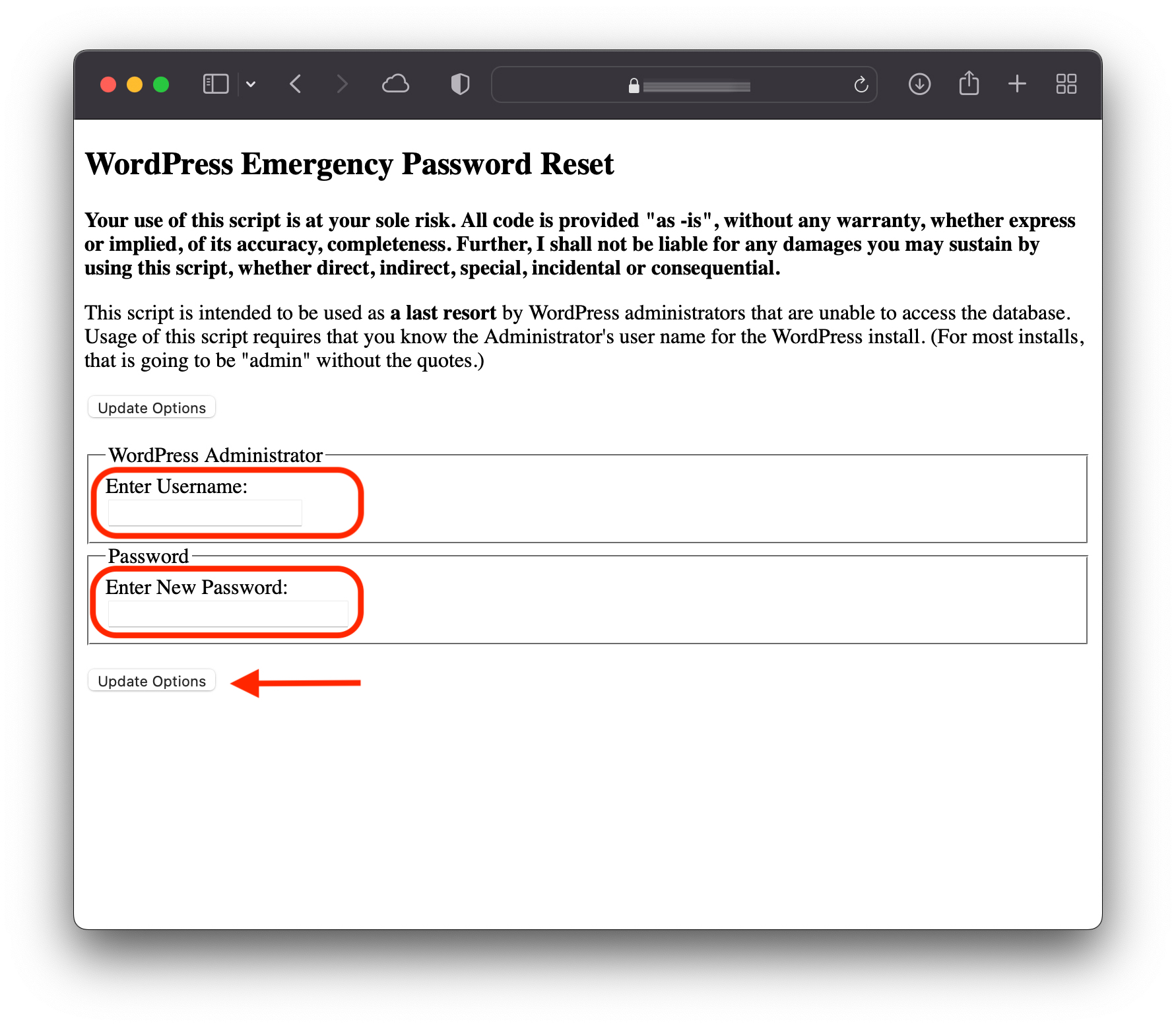
3. パスワードの更新 (更新オプション) をクリックすると、選択した新しいパスワードを含むメッセージが、リセットを行った管理者ランクを持つユーザーの電子メールに送信されます。
4. ファイルをサーバーからただちに削除します。どのユーザーでも使用できます。
Your password has been successfully changed
An e-mail with this information has been dispatched to the WordPress blog administrator
You should now delete this file off your server. DO NOT LEAVE IT UP FOR SOMEONE ELSE TO FIND!
これは、パスワードを回復するデータベースまたは電子メール アカウントにアクセスできないシナリオで、WordPress 管理者パスワードをリセットする最も簡単で効率的な方法です。


あなたも興味があるかもしれません...
