


Kėdė, jei naudosime naują technologiją “Intrivacija” a „Internet Explorer 8“ arba “Privatus naršymas” a „Google Chrome“, care ar trebui sa nu stocheze nicio informatie dupa navigarea pe web site-uri, iata ca ceva tot ramane in PC. DNS talpykla-ul.
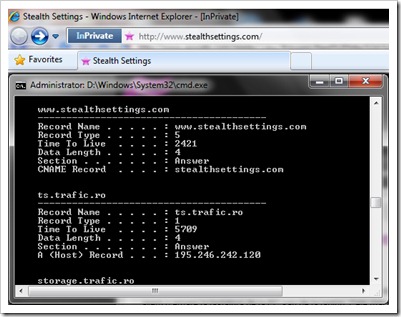
Pentru a vedea DNS Cache-ul este suficient sa deschideti Komandos raginimas si sa tastati :
ipconfig /displaydnsClear, Reset or Flush DNS Cache in Windows Vista, Windows 7 si Windows XP.
Tastati in Command Prompt :
ipconfig /flushdnsO sa primiti mesajul:
Windows IP konfigūracija
Sėkmingai išvalyta DNS sprendimo priemonės talpykla.
Į „Windows Vista“ ir „Windows 7“ va trebui sa deschideti cmdsu Administratoriaus privilegijos pentru a sterge DNS Cache.
Stop DNS Cache (metoda valabila pe toate sistemele de operare)
Pentru a opri DNS Cache-ul deschidem Command Prompt si scriem urmatoarea linie de comanda:
net stop dnscache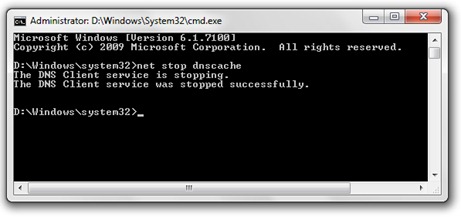
O serie de Programinė įranga-Uri antivirusinė ir ugniasienė va ofera inca din faza de instalare optiunea de a dezactiva DNS Cache, iar Internet Browser-ul „Mozilla Firefox“ va pune la dispozitie un priedas prin care puteti sa activati / dezactivati DNS Cache cu un singur click.
Allows you to disable and enable the DNS Cache of Firefox:
https://addons.mozilla.org/en-US/firefox/addon/5914
*Pentru a va face o idee asupra DNS talpykla ir DNS talpykla Poisoning, am gasit un articol foarte bun pe wikipedia.


Galbūt jus taip pat domina...

2 mintys apie “Išjungti & Išvalyti DNS talpyklą – „Windows 7“, „Vista“ & Xp”
Nagyon sokat segítettél Te vagy a leghasznosabb évek óta számomra! Köszönöm!
you are welcome ;-)