


När storleken på hårddiskar ökar, använder fler människor partitioner för att separera och lagra grupper av filer.
Windows XP använder C:Program Files katalog som standardbaskatalog där nya program installeras. Du kan dock ändra standardinstallationsenheten och/eller katalogen genom att använda ett registerhack.
Sikt de Registerredaktör (regelbundet) och gå till
HKEY_LOCAL_MACHINESOFTWAREMicrosoftWindowsCurrentVersion
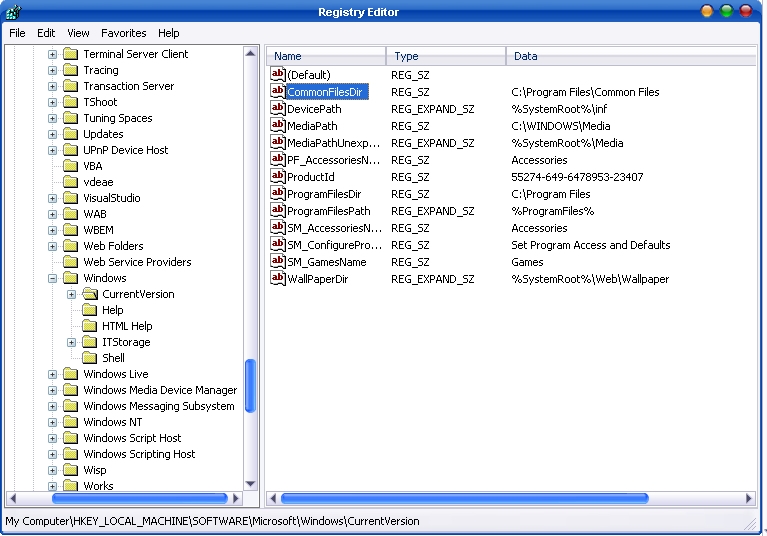
Leta efter värdet som nämns ProgramFilesDir. som standard kommer detta värde att vara C:Program Files. Redigera värdet till valfri giltig enhet eller mapp så kommer XP att använda den nya platsen som standardinstallationskatalog för nya program.


Du kanske också är intresserad av...

Prestigio Multipad Consul 7008 4G, 8 -Inch Compact Display Tablet
Den stora tillverkaren Prestigio tillkännagav lanseringen av en ny prisvärd surfplatta ur sortimentet avsedd för affärssegmentet, den nya MultiPad Consu...
Mortuary Orchestra of Realitatea TV
Jag har ingen tv i mitt rum, för det räcker med två datorer, fyra telefoner och två katter. Jag tittar på tv när jag sitter vid bordet och...
DACIA SANDERO lanserades i Rumänien!
Idag tog jag några bilder på Realitatea TV, från Dacia SANDERO lanseringsfest i Rumänien. Den nya Dacia-modellen ser ut...
Yahoo! Inställningar maila på din mobiltelefon, Outlook, Windows Live Mail, Mozilla Thunderbird – IMAP / SMTP.
Det är känt att Yahoo! Mail, erbjuder endast POP-stöd till användare som har Yahoo! Mail Plus (för 19,99 USD/år)...
Intrång.win.mssql. Worm.Helkern! / Kis
Jag har varit desperat i några dagar, Kaspersky Internet Security-larm, som:
Är det någon som har någon aning om vad Intrusion .Win.MSSQL.worm är....
Protest av Flickr-IR mot Microsoft.
Flickr.com är, som de flesta av er vet, en fotodelningssajt (kanske den största), som ägs av Yahoo! . En grupp...
Tema för Windows Vista -användare.
AeroVG-tema för Windows Vista
Installera: Extrahera innehållet i RAR-filen till: %windir%ResourcesThemes, högerklicka på skrivbordet och...
Tillägnad Alla hjärtans dag
Aaah ... hhh . Vad fort tiden går... Det är fortfarande några dagar kvar till 14 februari, Alla hjärtans dag och alla hjärtans dag...
Bröstlyft via Western Union
Asta e de rubrica "Stiati ca...?" si daca nu stiati, va spune Google.Stiati ca prin Western Union, in afara de bani se mai pot transfer...
GOOGLE PageRank Update / 11.01.2008 ?
Google si-a inceput anul 2008 cu o mica surpriza. Dupa ce ultimul update s-a lasat indelung asteptat, anul acesta Google face un update...
Lacoste krokodil, sprang till… tandläkare
Den berömda krokodilen på logotypen för det franska företaget Lacoste, tillverkare av kläder och parfymer, slukade flera vegetariska skyltdockor och skulle...
Adio Netscape Navigator / 1 feb. 2008
Webbläsaren lanserades av Netscape-företaget 1994 under namnet Mosaic Netscape 0.9, och 1998 öppen källkod för...
En tanke på “Ändra standardplatsen för installation av appar / Windows XP”