


Palielinoties cieto disku izmēram, arvien vairāk cilvēku izmanto nodalījumus, lai atdalītu un saglabātu failu grupas.
Windows XP izmanto C:Programmu faili direktoriju kā noklusējuma bāzes direktoriju, kurā tiek instalētas jaunas programmas. Tomēr jūs varat mainīt noklusējuma instalācijas disku un/vai direktoriju, izmantojot reģistra uzlaušanu.
Izkropļot uz Reģistra redaktors (regedit) un dodieties uz
HKEY_LOCAL_MACHINESOFTWAREMicrosoftWindowsCurrentVersion
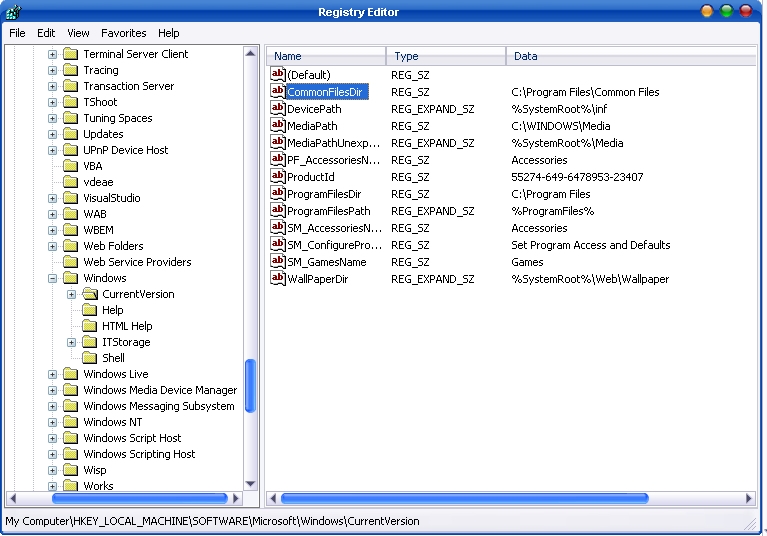
Atrodiet nosaukto vērtību ProgramFilesDir. pēc noklusējuma šī vērtība būs C:Program Files. Rediģējiet vērtību uz jebkuru derīgu disku vai mapi, un XP izmantos šo jauno atrašanās vietu kā noklusējuma instalācijas direktoriju jaunām programmām.


Iespējams, jūs interesē arī...

Prestigio Multipad Consul 7008 4G, 8 collu kompaktā displeja planšetdators
Lielais ražotājs Prestigio paziņoja par jaunas pieejamās planšetdatora izlaišanu no biznesa segmentam paredzētā klāsta, jauno MultiPad Consu...
Realitatea televīzijas orķestris
Man istabā nav televizora, jo man pietiek ar diviem datoriem, četriem telefoniem un diviem kaķiem. Es skatos televizoru, kad esmu pie galda un...
Dacia Sandero tika palaists Rumānijā!
Šodien Realitatea TV noķēru dažus attēlus no Dacia SANDERO atklāšanas ballītes Rumānijā. Jaunais Dacia modelis izskatās...
Iestatījumi Yahoo! Pasts mobilajā tālrunī, Outlook, Windows Live Mail, Mozilla Thunderbird – IMAP/SMTP.
Ir zināms, ka Yahoo! Mail piedāvā POP atbalstu tikai tiem lietotājiem, kuriem ir Yahoo! Mail Plus (par USD 19,99 gadā)...
Intrusion.win.mssql. Worm.helkern! / Kis
Dažas dienas esmu izmisusi, Kaspersky Internet Security signalizē, piemēram:
Vai kādam ir kāda nojausma, kas ir Intrusion .Win.MSSQL.worm....
Flickr-is protests pret Microsoft.
Flickr.com, kā vairums no jums zina, ir fotoattēlu koplietošanas vietne (iespējams, lielākā), kas pieder Yahoo! . Grupa no...
Tēma Windows Vista lietotājiem.
AeroVG motīvs operētājsistēmai Windows Vista
Instalējiet: izvelciet RAR faila saturu uz: %windir%ResourcesThemes, ar peles labo pogu noklikšķiniet uz darbvirsmas un...
Veltīts Valentīna dienai
Aaah ... hhh . Cik ātri skrien laiks... Vēl ir dažas dienas līdz 14. februārim, Sv. Valentīndienai un Valentīndienai...
Krūtis pacelšana caur Western Union
Asta e de rubrica "Stiati ca...?" si daca nu stiati, va spune Google.Stiati ca prin Western Union, in afara de bani se mai pot transfer...
Google PageRank Update / 11.01.2008?
Google 2008. gadu sāka ar nelielu pārsteigumu. Pēc tam, kad pēdējais atjauninājums tika gaidīts ilgu laiku, šogad Google veic atjauninājumu...
Lacoste krokodils, skrēja uz… zobārsts
Slavenais krokodils uz franču firmas Lacoste, apģērbu un smaržu ražotāja logotipa, aprija vairākus veģetāros manekenus un...
Adi Netscape Navigator / 1. februāris. 2008. gads
Pārlūkprogrammu 1994. gadā palaida uzņēmums Netscape ar nosaukumu Mosaic Netscape 0.9, bet 1998. gadā - atvērtā pirmkoda...
Viena doma “Mainiet noklusējuma vietu lietojumprogrammu instalēšanai / Windows XP”