

For different reasons each of us reinstall Windows from time to time. That it is about one virus who wreaked havoc or of o system problem, of or distribution or even a change of windows, the most boring process is the one that follows the system reinstallation, namely the selection and (re)installation of applications everyday - without which we cannot "survive" - especially since they cannot be installed at the same time, but we have to wait for the installation of one to move on to the next.
If you are among those who hate to waste part of their precious time with reinstalling programs, Ninite will come to your aid, installing for you the applications that you will select from freeware list (and only for personal use) available on www.ninite.com. Thus, while Ninite installs the desired applications, you can spend your time doing something useful (like counting sheep or green horses on the walls :P).
After you have selected the programs you want to install on your freshly reinstalled system, give click pe Get Installer - the big green button at the end of the list. Ninite will create one installer for you who it will download and install all the selected applications from the displayed list (click Save file in the download window that appears on the monitor).

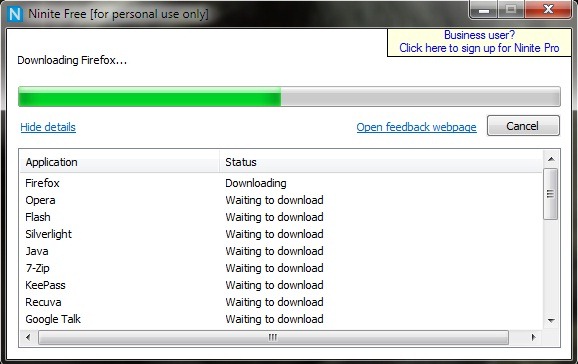
After the Ninite installer is downloaded to your computers, double-click it to launch it. All the applications you selected will be downloaded and then installed.
So, the next time you install Windows, don't worry about the time it takes to install the applications you need and let Ninite do the work for you. ;)


You may also be interested in...

10 thoughts on “Install with a single click the necessary applications after a system reinstallation”