


Virtual private networks (Virtual Private Networks - abbreviated VPN) are TECHNOLOGY of secure computer communications, based on public networks (these are usually used in companies). VPN technology was designed precisely to create in one public network o privacy subnet similar to those of private networks to which only authorized users have access, this not being able to communicate (intentionally) with other systems or with users of the public network on the basis of which the VPN network was created. In short, VPN networks help users secure data transfer and also through them I can access various Sites cu restricted access from certain countries/regions.

uSERS Windows 8 who wish to create such networks, either to increase information security, either to be able to browse the internet incognito, or either to be able to have access to certain website-uri restrictionate, you can follow the instructions below to learn how can i set up a vpn network on the supplied operating system.
How to set up a VPN in Windows 8
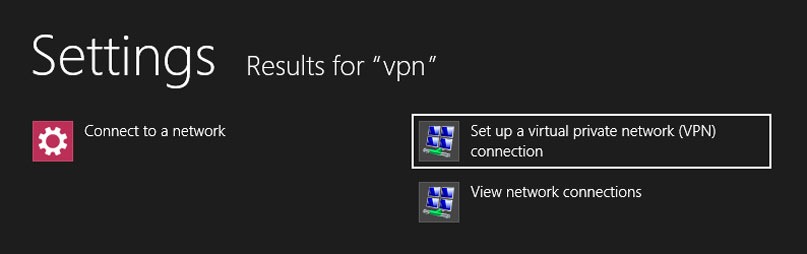
- open Start Screen If you taste vpn, then select Settings (on the right side of the screen) and click on the result Set up a virtual private network (VPN) connection
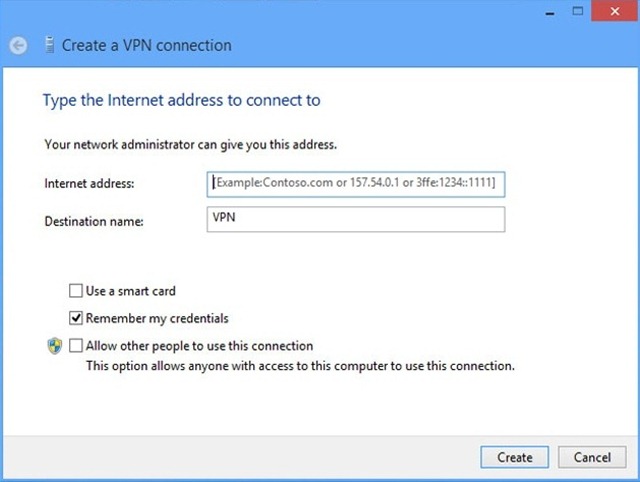
- in the opened window, enter VPN address (This is provided by the provider that you chose for VPN) then the name for the VPN connection and click on the button Create
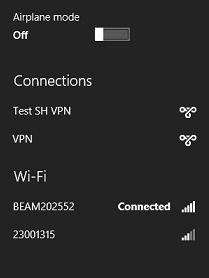
- after you have created the VPN connection, click on network icon from systray, then click on the button Connect from below the new VPN network display
- ENTER Customer and word (provided by the VPN provider) and click on OK
Once the network status is Connected, you can enjoy a secure and private browsing pe Internet. Enjoy!
Note: VPN addresses are provided for a fee by authorized providers. If you are interested in free VPN services, click on This link.
STEALTH SETTINGS – How to setup a VPN connection in Windows 8


You may also be interested in...
