


With the launch Microsoft Office 2013 Public Preview, Microsoft has launched and OneNote MX for Windows 8. OneNote It's O popular application To take notes, included in suita Microsoft Office, and also available for IOS mobile operating systems and Android. OneNote MX for Windows 8 it is optimized for Metro interface and for touchscreen-uri, with specific design for Tablets with Windows 8, and is found at download gratuit in Windows Store.
Once the application is installed, logged in with Microsoft account and this will be connected with any notebook OneNote stored in SkyDrive on that account. OneNote MX runs in full screen and has a sidebar on the left side where they can be selected and open Notebooks or nOTES previously created, and where users can create new notes.
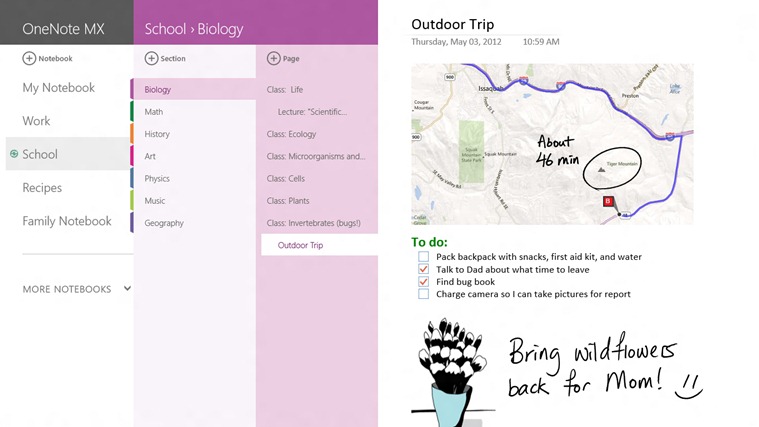
OneNote MX menu is placed in a specific hierarchy, namely first Notebooks, then the sections and page. When the sidebar menu is not used, it can be hidden from The menu available in Footer.
Probably the most important surprise of OneNote MX is Radial menu, specially developed for tablets/touch-screen, with which users can add in notes images directly from the camera or stored on the hard disk, tag-uri, tables, I can give paste to various items or texts and can add Points for listings.
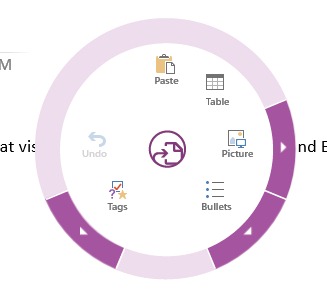
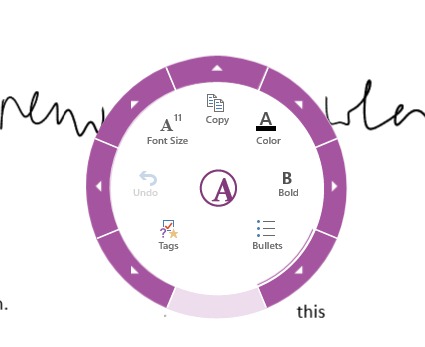
Every item in the menu has Sub-wetem which will only be displayed when the item is selected. Also the menu can Change the options Depending on the way it is used: for example, if we select a text in OneNote MX, the menu will change its options in Font size, Font Color, Font Format etc.
Although in the OneNote MX options is included also that of Account settings (Account settings), which allows users to add or delete accounts with which OneNote se synchronize and which store notebooks or notebooks, unfortunately at this stage of the application (by preview), there is no possibility to add or a delete items on the respective list.
For users Windows 8 interested in testing this app, OneNote MX is available for download in the Windows Store. If you fail to identify the application in the Store (currently it is only available in languages English, Japanese and Spanish), you can use This link to download it.
Note: OneNote MX is only compatible with the Windows 8 operating system.
STEALTH SETTINGS – Download OneNote for Windows 8


You may also be interested in...
