

ScreenGrab! is one of the best add-onof screenshots for Mozilla Firefox.
Add-on-allow us to take the capture (screenshot) to the web pages we open in Firefox. The add-on allows the capture for the entire open web page in the browser, for the visible area and/or for a certain frame on the web page.
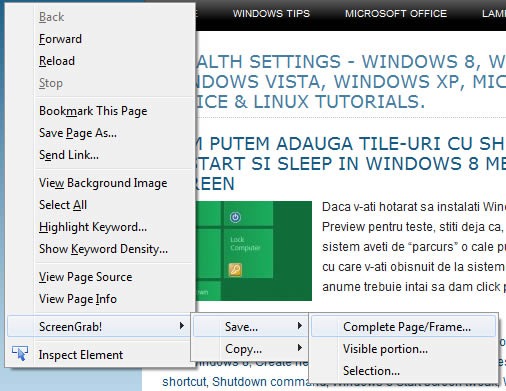
With the two options “Save” and “Copy” We have the opportunity to save screenshotthe on hard disk or to copy it on clipboard because then we can give them “Paste” in a document or in a Imagine editor.
Unfortunately in the official gallery this add-on is not compatible for Firefox 7.0.1. We managed to make a small change in the Screengrab source! to be able to install and use on Firefox 7.0.1.
Download Screengrab! For Firefox 7.0.1
{Filelink = 16}
Installation instructions:
1. Download the file screengrab-0.96.3-fx.xpi
2. Draw the file (dear & drop) in Add-ons Manager > Extensions.
Careful! After installing it “version” You may not receive updates anymore in case of launching a new official versions (version that belongs to the law author).
Stealth Settings – Download Screengrab! Extension for Firefox 7.0.1


You may also be interested in...
