


Viruses, Trojania, spyware programs and other types of malware they will always be a problem for users Internet. Their evolution in the last decade was extremely accelerated and, despite the numerous programe antivirus which tries to block the danger they represent, the "vaccine" for this "pandemic" has not yet been discovered. And in terms of "health" your operating system, you can never be too vigilant.
Permanent use of an antivirus is mandatory (even if most likely there will be certain viruses that will sneak into your system through different security breaches, it is preferable to have only one instead of 150, for example - recently encountered case) and, of course, periodic and complete scanning of the computer. And, last but not least, you keep almost a typical program removal tool, because - God forbid! - you never know when you will need it.
In case you face a virusare something more "bushy" of the operating system and even using a Removal Tool you still can't deal with it malware processes that have taken over your computer (often, even if the viruses are discovered, they refuse to be "kicked out", being kept alive of illegitimate processes which run unhindered in your system). Therefore, before using such a utility, it is recommended to use first Rkill.
What is Rkill?
Rkill It's O application little girl portable which stops/terminates in just a few seconds all the malicious processes running on your system, thus increasing the chances of a devirusari complete (which is fair, it is very possible to stop others legitimate processes – such as those of browsers, but you certainly don't want to need them during a scan, or those whose names are lender frequently by different malware).
How does Rkill work?
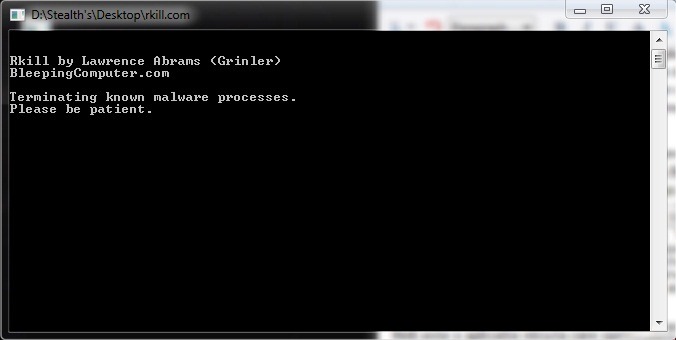
After downloading, double-click on Rkill. It will run in a Command Prompt, ending anything proces suspect running on your computer (suspicious does not necessarily mean illegitimate, so if you have doubts about a process running on your system, take a look here and maybe you'll find the information you're looking for), immediately after creating one log of stopped processes.
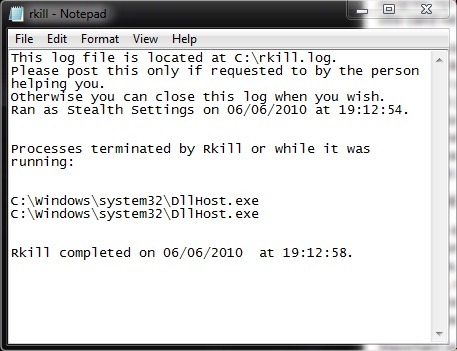
The important thing is that after using Rkill do not restart the system - because the stopped malware programs will start running again, but immediately scan it using the provided antivirus or a removal tool.
Credit @Grinler (BleepingComputers.com)
Use: Different fake antiviruses will "detect" Rkill as a threat to the bad operating system and will try to get rid of this program. If you find yourself in such a situation, do not close the error messages given by the fake antiviruses, but run Rkill several times to stop them (If the number of malware programs on your computer is in the tens, it is necessary to run Rkill several times to be sure that the core processes - illegitimate – of them are off).


You may also be interested in...

One thought on “Rkill helps you get rid of malware in the system!”