


When installing the operating system Windows XP, a creates a user which you can name as you like. This user (ex: stealth) will have Administrator user privileges, si va permite sa install programs, in change the settings essential features of OS XP and to create new users on the operating system.
Although this user has full privileges on the system, Windows XP create and user-ul Administrator. User who is invisible in User Accounts, Computer Management and Logon Screen.
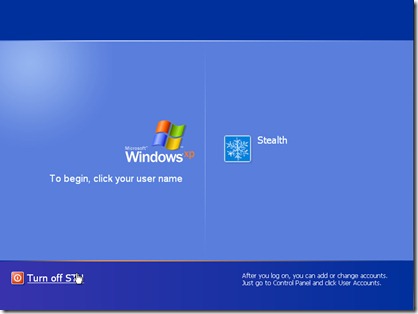
How to activate / make the Administrator user visible on Windows XP.
1. We go to Start -> Run -> tastam “regedit” to open the registry editor. (Registry Editor).
2. In the registry editor, go to:
HKEY_LOCAL_MACHINE\SOFTWARE\Microsoft\WindowsNT\CurrentVersion\Winlogon\SpecialAccounts\UserList .
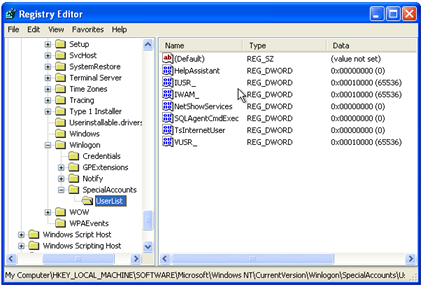
Click on UserList and see if there is a key in the list on the right “Administrator“.
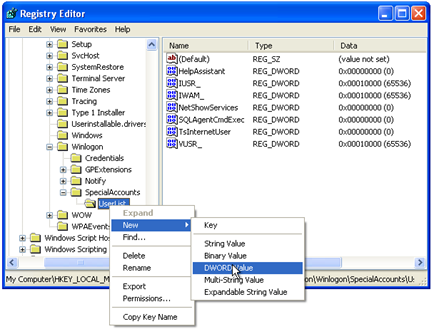
3. If we don't see it in the list “Administrator”, we right-click on UserList, we select New -> DWORDValue.
4. In the box that opens, write “Administrator” & Enter.
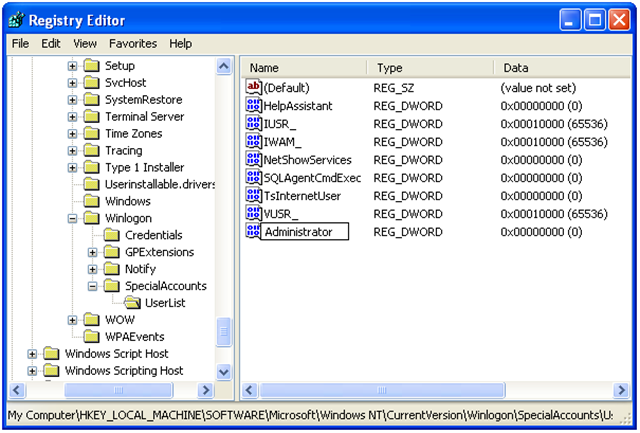
5. Click-right pe Administrator -> and at Value Data WE “1” & OK.
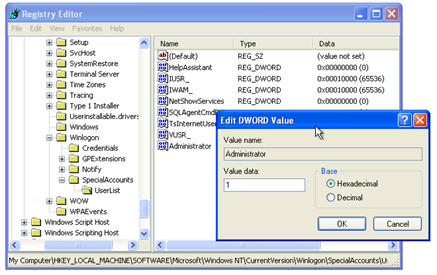
That's all we had to do to make the Administrator user visible on Windows XP. To check if it appears, go to Run box If you taste “control userpasswords” to open User Accounts.
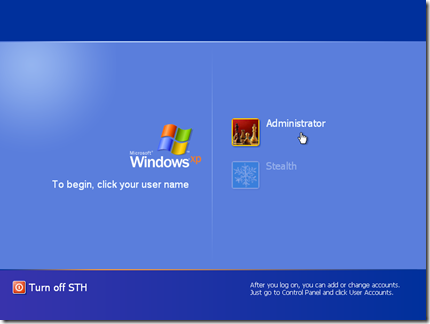
After restart or log off, you will notice that in login screen This is the same device as user-ul Administrator.
Tutorial tested on Windows XP SP2.
CAREFUL! Registries changes can lead to functional problems of the operating system or even to its complete destruction.


You may also be interested in...

One thought on “Activate USER Administrator on Windows XP”
Good article, but it seems like a bad translation from English to Spanish. I think it is an article translated by the GOGGLE Translator, it can be seen in the captured screens that they are in English