


Among the novelties it came with Windows 8 Consumer Preview, their replacement received the most criticism Start of the blind with one thumbnail visible only when we move the mouse cursor to the extreme lower-left corner (where the Start button used to be displayed), and Start Menu cu Start Screen.
Despite feedback negative received on this aspect, Microsoft it will not bring back the Start Orb and the Start menu The final version of Windows 8, which leaves two possibilities for dissatisfied users: either get used to the Start Screen, or turn to Third-Party applications to be able to use the Start Menu again.
If you are among those who are not yet ready to give up the Start menu, we recommend you to test it Classic Shell, and soft quite popular about 2-3 years ago, when it was developed to bring back the classic Start menu in Windows 7. After the release of Windowsd 8 Consumer Preview, a the new version of the application, compatible with the new one operating system.
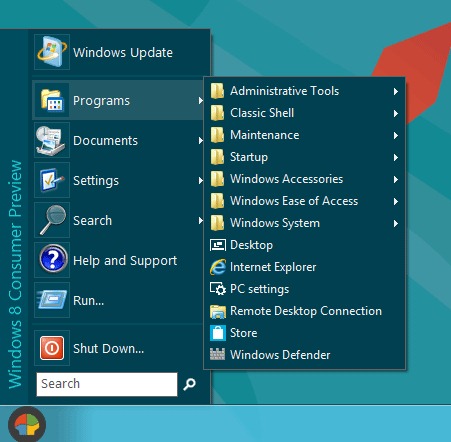
Classic Shell Start Menu it is Customize, its users having the possibility to modify both image of the Start Orb as well the menu skin, to display menu in 2 columns, and to display NAMEs or the user's picture in the menu. They can also be added new items to the menu, or eliminate if they are no longer needed.
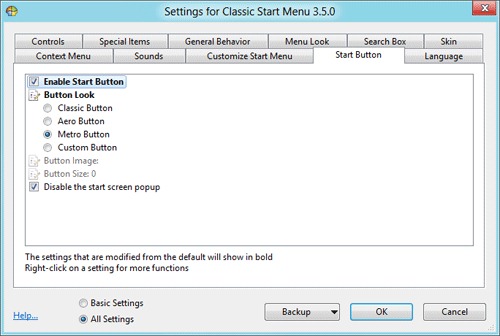
To access the Classic Shell Start Menu options, right -click on Start Orb and select Settings.

Note: Classic Shell Start Menu is still compatible with Windows Vista, Windows 7, Windows Server 2003 and Windows Server 2008 R2.
STEALTH SETTINGS – Add Start Orb And Start Menu in Windows 8 Consumer Preview with Classic Shell


You may also be interested in...

2 thoughts on “Adauga Start Orb si Start Menu in Windows 8 Consumer Preview cu Classic Shell”