

Most users of the Firefox browser have saved Bookmarkuri in it, which they most likely want to keep in case, for various reasons, they have to reinstall the operating system or if they start using it everything computer. Also, the same thing is valid when a user changes the user created in Firefox.

If you are also in one of the situations above, and you want to keep bookmarks saved in Firefox, the simplest is to use the option of export/import your browser.
- first open the browser Firefox in the user account that you have bookmarkurile that you want to import.
- click on the orange Firefox button in the upper-left corner of the browser and select Bookmarks > Show All Bookmarks from the displayed menu (or click on Bookmarks > Show All Bookmarks in menu bar). You can also use the key combination Ctrl+Shift+B.

- In the open window, click on Import and Backup And select the option Export Bookmarks to HTML…
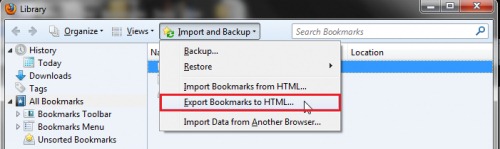
- if you want to import the bookmarks on another computer, save the backup on one external storage (for example USB Stick); if you want to import the bookmarks into another user account, save the backup in a handy location.
- open again Firefox, pe the new computer or in new user account.
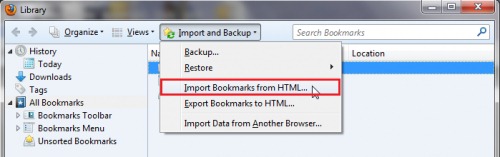
- go to again Bookmarks > Show All Bookmarks and click on Import and Backup
- Then select the option Import Bookmarks from HTML… and select the backup file saved earlier
And that's it. All bookmarkurile dvs from Firefox were imported on the new computer or new user account.
STEALTH SETTINGS – How to import Firefox bookmarks to another user account or to another computer


You may also be interested in...

Project Spartan, the substitute for Internet Explorer, revealed in an unofficial video presentation
Revealed during the Windows 10 presentation event, which took place in January, Project Spartan, the web browser that...
How can we activate the Share Services feature in Firefox
With the release of Firefox 35, Mozilla introduced new features in its web-browser, one of which is Share Servi...
Mozilla will replace Google Search with Yahoo in Firefox browser
After a partnership that lasted ten years, Mozilla decided to give up Google Search, the default search engine of the Fire browser...
How can we disable automatic loading of images in Firefox
Sometimes we find ourselves in a situation where the only available network is one with a weak Internet connection (hotspots, mobile networks in the network...
Mozilla launched Firefox 31
Mozilla released today the stable version for the Firefox 31 browser, which comes bundled with fixes for 14 vulnerabilities d...
What is new in Firefox 30
Firefox 30 is available starting today on Mozilla servers, the update will be made available in the browser in the next few days...
Changed interface and new customization options for Firefox 29
Mozilla has launched Firefox 29, the newest version of the popular web-browser that comes with a brand new interface with an elegant design...
Mozilla gives up the modern version of Firefox for Windows 8
Almost 2 years ago, before Microsoft released Windows 8, Mozilla announced that they had already started working on a version...
Mozilla added all recent java updates in blocklist
In all recent Java updates, without exception, vulnerabilities have been discovered that allow hackers to take control over...
Firefox 18 launches with numerous performance improvements (download link included)
Although the final Firefox 18 has not yet been officially released, and the changelog for it has not yet been made public, users who want...
How can we activate Facebook integration into Mozilla Firefox
The latest version of Firefox, 17.0, also comes bundled with a native integration of Facebook in the browser (more precisely for Facebook Chat, u...
Mozilla concluded the Firefox 3.6 support support! Upgrade to version 12
More than a year ago, on March 21, 2011, Mozilla finally released, after many beta versions, Firefox 4, the fi...