


Because of the changes made in registers of the various installed and uninstalled applications from the system, or, above all, from the cause various viruses (or other programe malware) who visited our computers, it happens from time to time that we encounter problems accessing certain folders/partitions ("you don’t have the permission to access this...") or even find ourselves unable to perform changes in system files (Registry Disabled), plus various other errors. These problems are mostly caused by the changes undergone by Windows Security, most of them being made by third party programs (usually malicious) without us having any idea.
Rizone Security Restore It's O Portable application (does not require installation) which solves the problem of errors of this kind, by restoring Windows security settings to the values default. Thus, every time you are greeted by dubious messages when you want to access certain folders/files, you only have to use this free application to reset Windows Security.
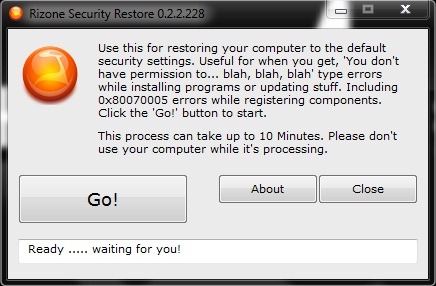
How to use Rizone Security Restore?
- downloadati the application and then double-click on it to run it
- close any other program you have open and click on the button Go to start the reset process (usually it takes ~5 min)
- once what Windows Security returns to the initial settings, you will be able to access any folder/file that were inaccessible before the restoration. Also, if you meet before installation errors – installation failed message – of certain programs (eg antivirusion), Rizone Security Restore will also solve this problem.
Note: This application is compatible with Windows XP, Vista and 7.


You may also be interested in...

One thought on “How can we return to Default Windows Security settings”