


Microsoft Office is definitely the most widely used and indispensable software suite for computer users around the world. Whether you're an individual user, a freelancer, or a business, it's important to understand the differences between Microsoft 365 and Office 2021 to get the most out of Microsoft's Office suite of applications and make an informed choice.
content
Choosing the version of the package Microsoft Office is very important and you have to take into account first of all the need to use the applications in each suite, number of users and devices on which you use the applications and of course, the costs.
Differences between Microsoft 365 and Office 2021 (options and prices)
It's important to consider your individual needs and preferences when deciding which of these two Office suites is the best fit for you or your business.
Microsoft Office subscriptions and pricing
If you are a user who only needs Microsoft Office for Word, Excel, PowerPoint applications, then it is very important to consider the price differences between the two versions of the suite Microsoft Office.
Microsoft 365 is a monthly or annual subscription-based service that ensures you always have the latest and most modern productivity tools from Microsoft. The suite comes in two subscription versions: Microsoft 365 Family, priced at $99.99 / year (or $9.99 / month) and Microsoft 365 Personal, for which the subscription costs $69.99 / year ($6.99 / month).
On the other side. Microsoft Office 2021 is a one-time payment, with no monthly subscription or other subsequent costs. The (official) price for the Office Home license & Student 2021 is $149.99, but there are many online stores that sell licenses for this suite at much lower prices.
Options and applications available in versions of Microsoft Office
In addition to prices and how to purchase, the differences between Microsoft 365 and Office 2021 are significant in terms of applications, the number of users and devices, updates and services available.
Related: How to Update to Microsoft 365 and Office 2021 on Windows 11
Microsoft 365 includes additional services such as storage space in cloud (OneDrive), calls and online conferences (Microsoft Teams) and integration with other Microsoft services. These are unavailable in Office 2021, which focuses exclusively on standard desktop applications such as Word, Excel, PowerPoint.
subscription Microsoft 365 Family provides 6TB storage space in the environment OneDrive – Cloud, divided for 6 users who can use the applications in the suite. Each user can install and use Microsoft 365 on 5 devices simultaneously.
Microsoft 365 enables real-time collaboration with documents and files through cloud-connected features. Users can work together on the same document simultaneously and see changes in real time. Office 2021 lacks these real-time collaboration features and requires you to manually send files to share and edit them collectively. So, for team productivity, Microsoft 365 is the best solution. In addition to collaboration options, Microsoft 365 also provides access to Microsoft Teams and Skype applications.
As for the Outlook client, it is only available for Microsoft 365. But there are robust alternatives such as: Windows Mail or Mozilla Thunderbird.
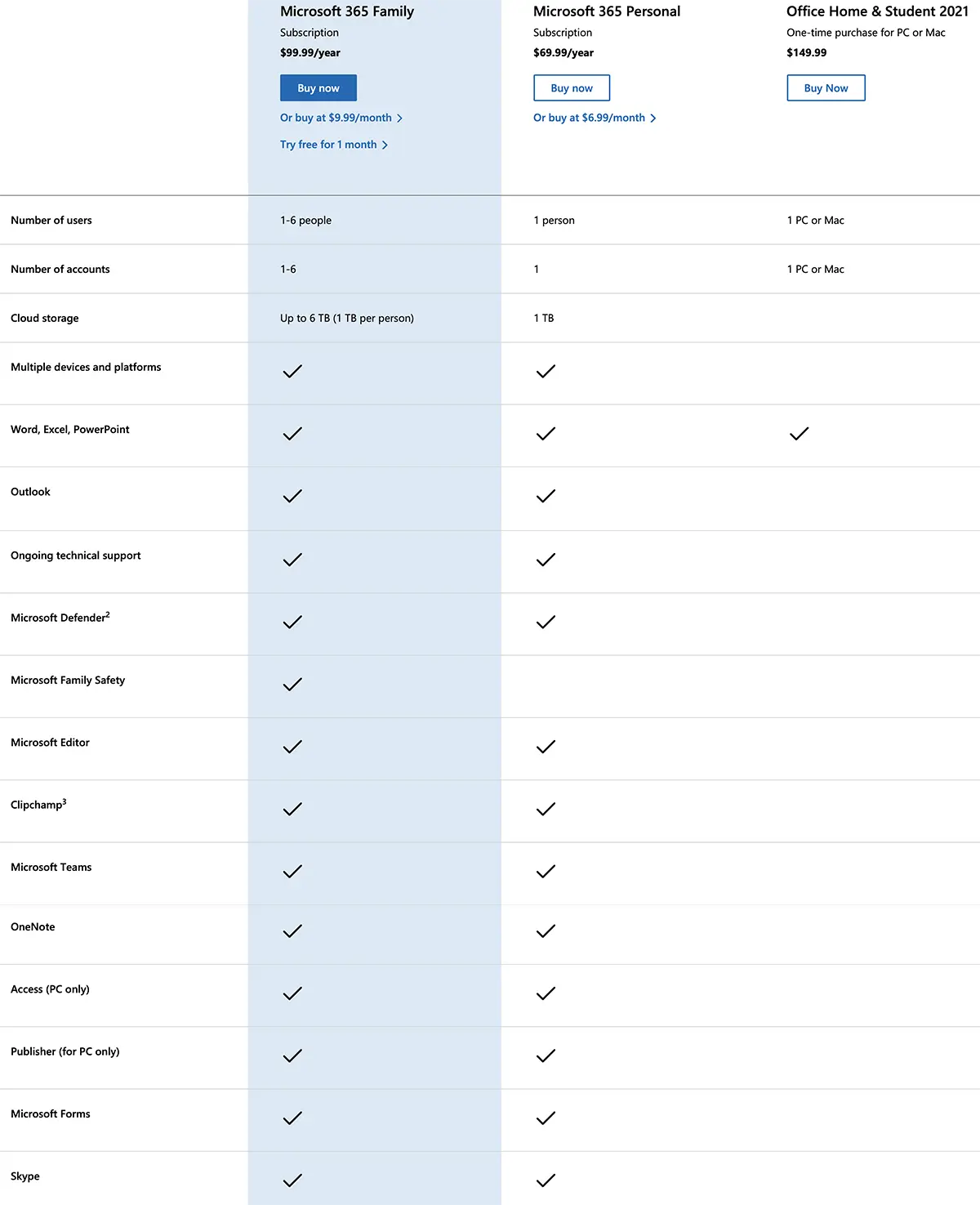
In conclusion, before choosing which version of the Microsoft Office suite you want to buy, you need to consider the degree of usability of the applications in the suite. Number and types of devices you want to use the apps on, the need for OneDrive data storage service, the OneNote app (only available for Microsoft 365), collaboration needs with other users, updates, and pricing.


You may also be interested in...
