
Skip to navigation Skip to main content
Stealth Settings
Menu
Stealth Settings
  • Home
  • Windows
  • macOS
  • Linux
  • Office
  • WordPress
  • AI
May 9, 2021 On May 14, 2014

by

Posted by stealth
3

Protect your Facebook account using temporary passwords for applications

Facebook, Internet, Noteworthy, Tutorials and IT news

Protect your Facebook account using temporary passwords for applications

Posted by author-avatar stealth
May 9, 2021 On May 14, 2014
3

Nowadays it has become much easier to metal on different applications, services or Websites USING the user and password of the Facebook account. If you are worried as the security of the accounti de Facebook is endangered because of the entry of its password to log on to various applications (eg Skype), it would be best to start to Teduver words generated for the respective applications. In this way by introducing temporary passwords (Facebook validate) instead of the true password, will protect your Facebook account and do not risk that the password for it is stolen by potentials Applications or malware scripts.

How can you generate temporary passwords in Facebook to log on to various applications that allow the edges of the Facebook account?

  • log in to personal account of Facebook, then click on Arrow down (right-right corner) and select Settings from the displayed menu
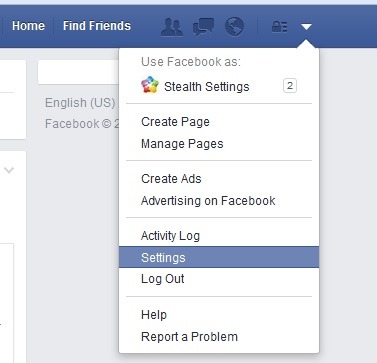
facebook-settings
  • In the settings screen, click on the option Security displayed in the left panel
facebook-security-settings
  • In the right panel, click on the button Generate app passwords displayed next to the option App Passwords
generate-app-passwords
  • In the window for generating your displayed passwords, click on the button again Generate app passwords for confirmation
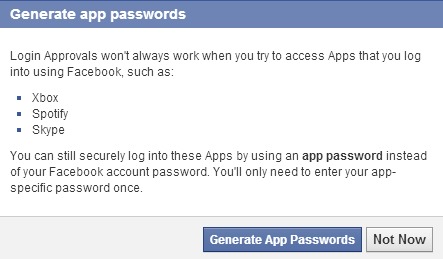
confirm-generate-password
  • Then enter the displayed field the application name for which you want to generate your password and click on Generate Password
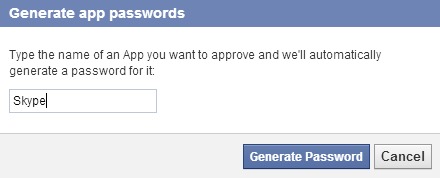
select-app-for-temporar-password

After pressing that button, Facebook It is generated random password For the selected application, which it will display it once (Be careful to note it so you don't forget it). After the temporary password is generated, open the application you want to connect with Facebook credentials And instead of the real password use the password offered by Facebook.

If you want to Created Teduver Words For more applications At the same time, after gerent first temporary password click on Next Password and repeat the steps described above (for a different application).
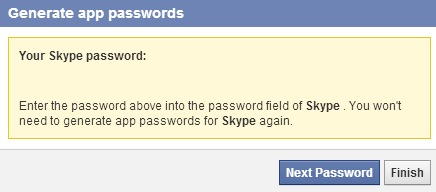
next-password

Note: Note that the temporary passwords generated by Facebook can only be used once. Whenever you want to log in again on the applications for which you have temporary passwords, you will need to generate other passwords, because the old ones will not work.

STEALTH SETTINGS – Protect your Facebook account by using temporary passwords to log on applications

Protect your Facebook account using temporary passwords for applications

What’s New

  • Enable preview of PDF, Excel, or Word files in Windows 11 - (Preview Pane)
    Enable preview for PDF, Excel, or Word files in Windows 11 – (Preview Pane)
    December 24, 2025
  • Windows 11 Build 27823 - Top Cards
    What's new in Windows 11 Build 27823. Top Cards.
    March 27, 2025
  • Google Analytics
    How to remove _gl and _ga parameters from a website's URLs.
    March 25, 2025
  • Google Core Update SEO - March 2025
    Sudden drop in organic traffic on the site in March 2025? Google Search Core Update
    March 23, 2025
  • How to configure Fail2Ban for WordPress (wp-login, xmlrpc)
    How to configure Fail2Ban for WordPress (wp-login, xmlrpc)
    March 17, 2025
  • GPT-4.5
    What's new in GPT-4.5? The most powerful ChatGPT model.
    March 2, 2025
Facebook featuresFacebook SecurityFacebook SettingsFacebook Tutorials & TipsLog in using Facebook
Facebook, Internet, Noteworthy, Tutorials and IT news
Newer
How can we find out which version of Windows 8 Rulam on your personal computer
Back to list
Older Microsoft extends the Windows 8.1 support to June 10, 2014
author-avatar

About stealth

Passionate about technology, I like to test and write tutorials about Windows operating systems, seeking to discover interesting things.

View all posts by stealth

You may also be interested in...

18 Sep

Disabling Auto-Video Video on Facebook and settings for video quality (HD & SD)

Facebook recently introduced new options for video content published on the social network. By default, videos for...
Continue reading
07 Feb

How can we disable Facebook mail account

Many Facebook users do not know that, once the Facebook profile is created, a Facebook email address is also created by default...
Continue reading
26 Dec

How can we block invitations for games or applications in facebook

I don't think there is even a single Facebook user who is not irritated by some feature or various activities that happen on ...
Continue reading
07 Sep

How can we rearrange the order of uploaded photos in the Facebook account

When we upload several photos at the same time on Facebook, they are arranged by default by name. Once u...
Continue reading
24 Aug

How can we give unhide in facebook news feed to previously hidden contacts

One of the Facebook features that many users are grateful for is the option to hide personal updates...
Continue reading
16 Aug

How can we hide your Facebook friends list

For Facebook users, protecting privacy has always been a priority, which is why Facebook updates every...
Continue reading
20 Jul

How can we delete or hide the history of personal Facebook account

In recent years, Facebook users have started to realize more and more how important privacy settings are...
Continue reading
14 Jul

How can we rearrange the order of tabs and sections in the sidebar in Facebook Timeline

A very useful tutorial in which we see in detail how we can rearrange the order of tabs and sections in the sidebar in Facebook Timeline...
Continue reading
Facebook Extensions and Widgets
02 Jul

How can we use Facebook Chat Heads in Chrome

Update: The Facebook Chat heads extension in Chrome is no longer up to date. This has been pulled from the Google Chro...
Continue reading
27 May

Facebook will improve your privacy settings for new users

When a new user creates an account on Facebook, the default visibility settings for his posts are public, those...
Continue reading
21 May

Facebook is enriched with a function of audio recognition similar to Shazam

Facebook will soon add a new feature to the social network, namely one of audio recognition, similar to the popular application Shaz...
Continue reading
02 May

How can we view the updates on Facebook in chronolygic order

You've probably noticed that for some time, Facebook displays in the News Feed the most interesting updates posted by your friends (or...
Continue reading

3 thoughts on “Protect your Facebook account using temporary passwords for applications”

  1. Sihame emg says:
    April 15, 2021 at 04:59

    My account is hit by pissshing please help

    Reply
  2. Jhajaira Gabriela Salas Paredes says:
    September 30, 2022 at 21:48

    As I do to enter my Facebook account if I have another number my created account is with this number 931011847 and now I have another number as I do to recover my account

    Reply
  3. Jhajaira Gabriela Salas Paredes says:
    September 30, 2022 at 21:50

    As I do to enter my Facebook account if I have another number my created account is with this number 931011847 and now I have another number as I do to recover my account

    Reply

Leave a Reply Cancel reply

Your email address will not be published. Required fields are marked *

© 2025 Stealth SettingsTutorials and news from information technology.
RomânăEnglishFrançaisDeutschItalianoEspañolPortuguês日本語한국어Lietuvių kalbaNorskNederlandsPolskiDanskSuomiEesti keelLatviešu valodaБългарскиУкраїнськаSvenskaČeština
Privacy policy | About cookies | Contact | About us
  • Home
  • Windows
  • macOS
  • Linux
  • Office
  • WordPress
  • AI