

Among the novelties in the operating system Windows 10 (at least the version Technical Preview) the button is also counted Search available on the left a Taskbar, which users of this system can use to perform both local searches (pe hard-disk) as well as online, through Bing.
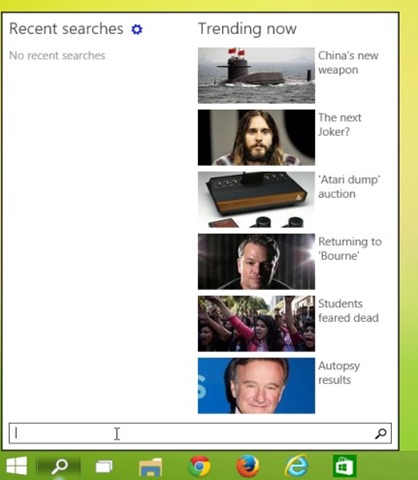
Although this could be helpful in certain situations, there are enough users who consider the new button Search as being useless and he prefers to hide to release space-bar pe Taskbar. Fortunately though Microsoft did not equip that button with an o default option for enable/disable, Is there a method of concealment its quite simple, by means of a register hack.
How do we hide the Search button from the Taskbar of the Windows 10 system?
- open Registry Editor (taste regedit in Run And give Enter)
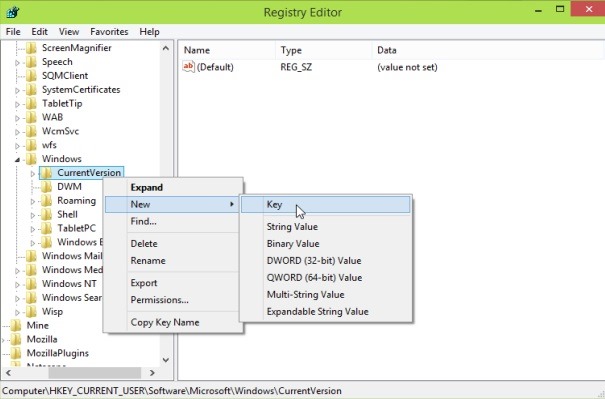
- Navigate to the key HKEY_CURRENT_USER\Software\Microsoft\Windows\CurrentVersion
- on the left side, below CurrentVersion, created a New Key to whom you will give the name Search
- then, under the key Search, on the right side, create a new one DWORD entry which you will name EnableProactive and to whom you will leave value 0
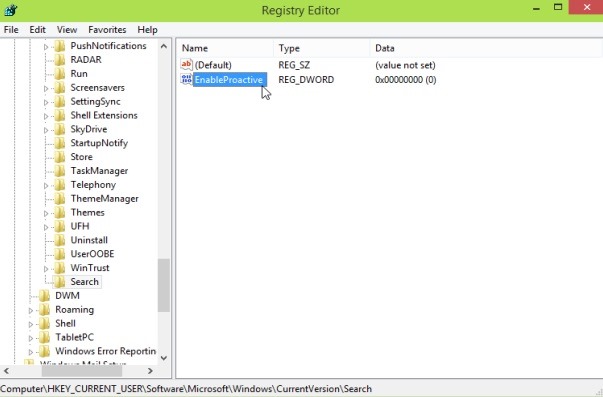
After you do this change in registers, close the Registry Editor and give a restart the system. After restart the Search button FROM Taskbar it will be hidden.

If later you want to show the Search button in the Taskbar again FROM Windows 10, delete the Search key which you created using the instructions above.
Update: If you want to hide the button as well TaskView FROM Windows 10 Taskbar, open regedit and browse to the key HKEY_CURRENT_USER\Software\Microsoft\Windows\CurrentVersion\Explorer. Under Explorer create the key MultiTaskingView, then, under MultiTaskView, create the key AllUpView. On the right side, under AllUpView, create the DWORD entry Enable which you will leave value 0. After restart system, and the button TaskView will be hidden from the Taskbar.

Note: Before making any changes to the registries, create a backup of them or a restore point of the system to ensure that you can repair without any consequences on the system any possible error that could appear as a result of those changes.
STEALTH SETTINGS – How to hide Search button on the Windows 10 Taskbar


You may also be interested in...
