


If you often happen to forget or not be careful about what locations I am save various files discharged from internet (Although most Downloaded files are saved in the locations default or user -set locations, in some cases files can be saved in leaflets different; for example the browser Firefox set the locations in which the files discharged according to SERVERS from which they are downloaded) a simple solution to find the respective files but also the locations in which they are saved is to use the utility OpenSaveFilesview. Also, with the help of this utility, you can find out and What files were recently opened on your system
OpenSaveFilesview It's O Free application and portable (does not require installation), which allows users Windows to keep obvious files/programs saved in the system and whether or not they were recently opened.
How does opensatefileview work?
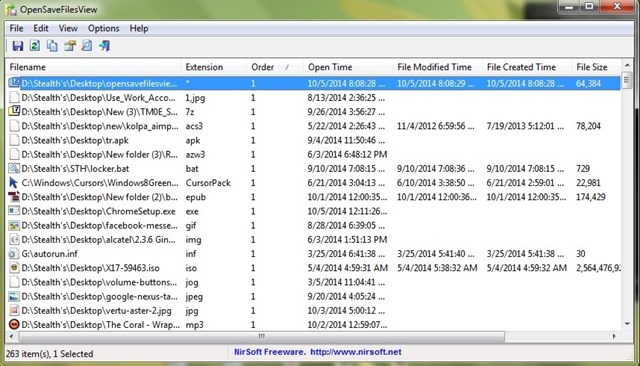
The application displays o list with the most recent programmer and/or FILES saved in the system, offering a series of information about these, such as: NAMEs files, extensions them, The order in which they were opened or saved (the order is displayed according to each type of extension), the last time the files were opened (this information is displayed only for the last opened files for each file type), the date of creation or MODIFICATION respective files, SIZE their files and attributes.
Cum OpenSaveFilesview It does not require installation, to run the utility you only have to double-click on it. Also, the use of the application does not create or modify dll files from the system; the information displayed by OpenSaveFilesview are taken from System Register.
Download OpenSaveFilesview 32-bit.
Download OpenSaveFilesview 64-bit.
Note: Application compatible with all versions of Windows starting with Windows 2000.
Credit @NirSoft
STEALTH SETTINGS – How to check what files were recently opened or saved in Windows


You may also be interested in...
