

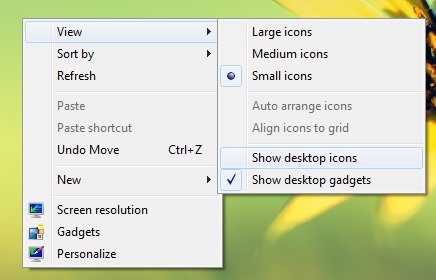
If you count yourself among the users of Windows who have Desktop full of icons, whether they are shortcut-uri of some Applications used frequently, whether they are leaflets or FILES To which you want to have quick access, the most probail happened to you to find yourself in situations where you need a need clean desktop For various reasons (you want to make a screenshot And you do not want the icons on the desktop to be visible, or they will distract you from work or get tired of your eyes, etc.), but you do not want to permanently give up the respective icons. For such cases, a solution would be to give Click-right on the desktop, then click on View And to dispel the option Show desktop icons (Later you can the iconites from the desktop ticking back the option).
But much simpler and faster (if you happen to you to hide the icons on the desktop) it would be to Create a shortcut to meet this action.
How can we create a shortcut to hide (and reafns) the icons on the desktop in Windows?
- First of all you need a small utility and portable (does not require installation), called HideDesktopIcons (This makes no changes in the system, but makes the same as the default show desktop icons), which we recommend to save in a different location from desktop, where you will not be accidentally erased (for example you can save/move it to My Documents or Program Files)
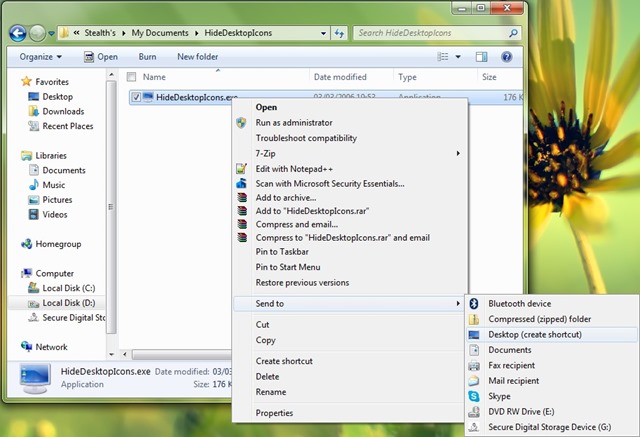
- Then create one shortcut pe Desktop for the utility you will fixed (pin) in Start Menu/Start Screen or Taskbar (Later you can delete the shortcut off the desktop)
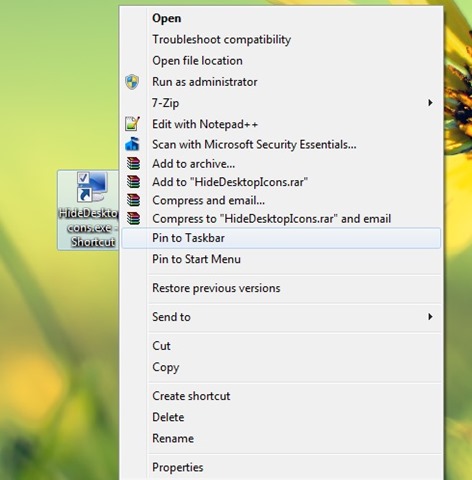
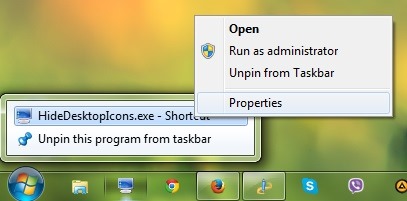
- If you want to assign them to the application and one Shortcut on the keyboard (To hide and display icons on the desktop using a Combination the Taste), click-right on shortcut-ul HideDesktopIcons Fixed at Menu/ Screen Start or Taskbar and select Properties
- Then in the tab Shortcut, type the combination of keys you want to use in the field next Shortcut key (eg, you can use the combination Ctrl + Alt + D)
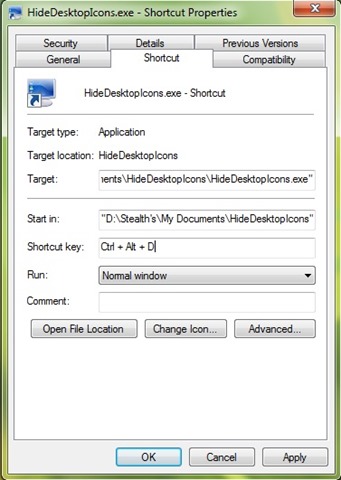
And ready. After you make the settings described above, you will be able to use either Shortcut fixed in Start Menu/Taskbar, either the combination of keys attributed to it for a hide SI and the iconites from your successful desktop!
Download HideDesktopIcons (Windows tool).
Note: If you cannot run the usefulness of Hidedesktopicons, you most likely have to install Microsoft Visual C ++ in Sisitem, which you can download here.
STEALTH SETTINGS – How to create a shortcut to hide and display Desktop icons in Windows


You may also be interested in...
