

One of the biggest user complaints Windows is that every time I use it the integrated uninstaller in the system for a uninstall an app, it leaves some "memories" behind, usually it is about user settings/preferences for the respective application, which may lead to the appearance of certain fall when we want to reinstall the application, or even I can give conflict with other applications like the uninstalled one. That's why most users use Third-Party applications to uninstall applications from the system, precisely to ensure that they do not leave any traces (in FILES or registers) after uninstalling.
One such application, which allows Windows users to completely uninstall any application installed in the system, it is and Geek Uninstaller.
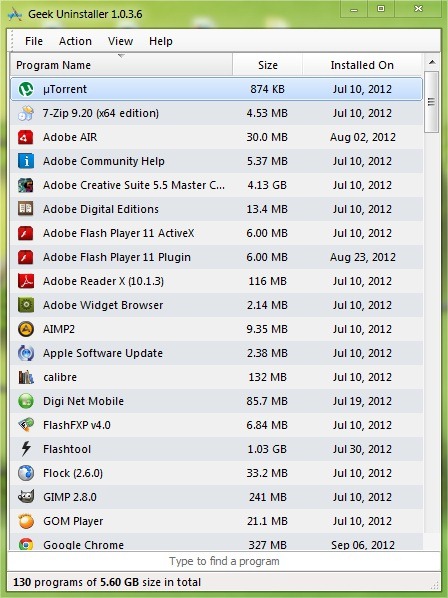
Geek Uninstaller interface it is very simplicity which makes it easy to use by any category of users. One of the great pluses of the application is that does not need to be installed (it is portable), and after it is started, scan the system very quickly to identify the installed applications, which it then lists in the main window. It also has the option of Search, so that, if you have a lot of applications installed in the system, you will not have to waste time looking for the one you want to uninstall, but simply write the name to identify it. Once you find the application, right-click on it and select Uninstall from the menu.
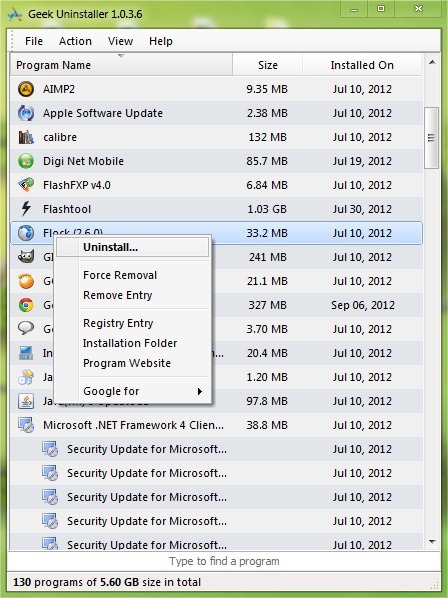
Geek Uninstaller also has an option to Force Removal, which will scan Window Explorer-ul and the locations of the registers to identify anything file and register related to the application you want to uninstall (from the right-click menu you can open the locations where they are located).
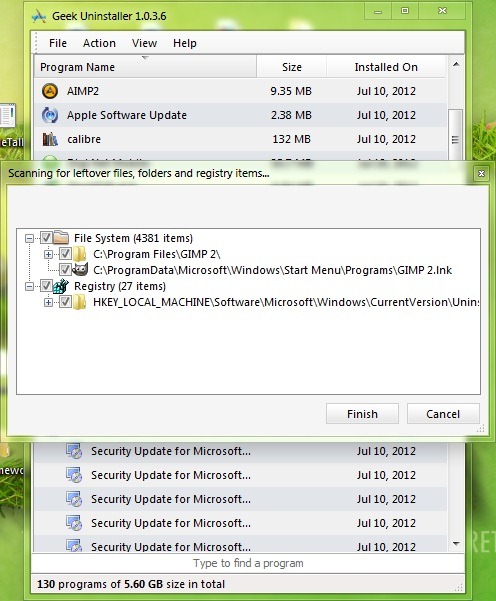
Be careful, however, before deleting these files, to create one back-up al registrilor and one restore point for the operating system (being a portable application, Geek Uninstaller does not have the options to create backups and restore points), to avoid possible consequences unpleasant.
Note: Free application. Compatible with Windows XP, Windows Vista, Windows 7 and Windows 8.
STEALTH SETTINGS – Uninstall any Windows app with Geek Uninstaller


You may also be interested in...

4 thoughts on “Uninstall any Windows application with geek uninstaller”