

Any application installed in the system face changes in registers yes in core files of it, and when it is uninstalled, the respective changes remain "legacy". Over time, these changes it clutters the registers and create lags in system reactions, they can even cause it fall its.
Uninstallerele I am Applications created precisely to avoid such problems, intended to completely uninstall any application which we no longer want in the system, but most of them do their job sometimes more or less than necessary: some do not clean properly, others clean what they should not. In addition, uninstallers that are installed in the system can also leave traces when they are uninstalled.
GeekUninstaller It's a free uninstaller and portable (I mean does not require installation) which not only as uninstall the applications which we no longer need, but scan the system to clear all entries made by them in registers or in Windows folders and files.
How does GeekUninstaller work?
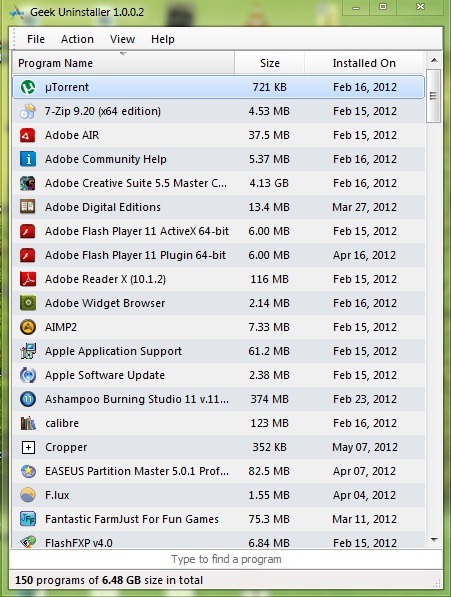
Immediately after launch, GeekUninstaller displays a list However Applications installed in the system, size in MB or GB the date they were installed, they can be sorted according to these parameters (name, size, date).
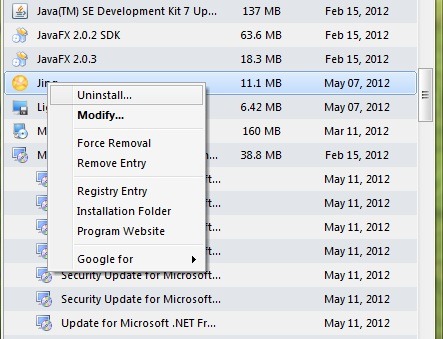
In order to uninstalled one of the applications from the displayed list, right-click on it and then select the option Uninstall from the menu.
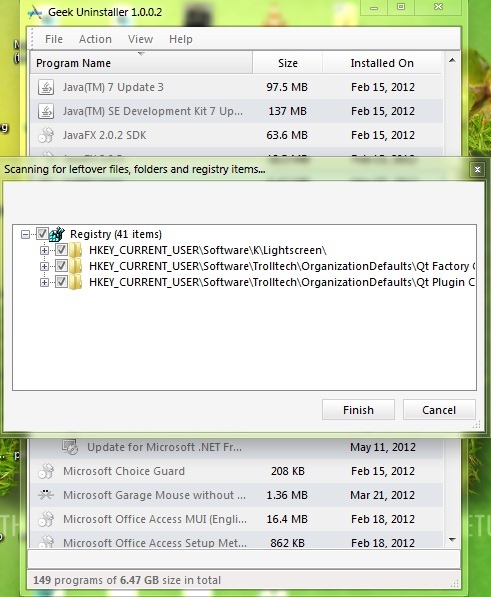
After uninstalling the application, GeekUninstaller will scan the system to identify the "traces" left by it.
For applications that are not responding or that are installed incorrectly, there is the option Force Removal which allows forced uninstall of them.
Note: The application is available in 34 languages and is compatible with Windows XP, Windows Vista, Windows 7 and Windows 8.
STEALTH SETTINGS – Portable uninstaller for Windows applications


You may also be interested in...

2 thoughts on “Uninstaller portable for Windows applications”