


Most users Windows 8 They were looking forward to the launch Windows 8.1 update, which came to the package with a series of new features, like the start button, the option of a boota direct in Desktop or more dimensions for tile-uri, and with improvements like the new Search, more personalization options a Start Screenor o integrate Better a SkyDriveto. They have the opportunity to Free Upgrade to Windows 8.1 through Windows Store, and Windows 8 reminds them of this by notifying Get Windows 8.1 for free displayed periodically on the computer screen.

But there are also users who, for some reason, do not want to install this update (Windows 8.1) and for which periodic notification It can be, in the best case, irritating. If you are in this situation and you want to find out how you can get rid of notificarea “Get Windows 8.1 for free” in Windows 8, you have two methods to deactivate its display.
How can we turn off Get Windows 8.1 for free in Windows 8?
1. Through Group Policy Editor
- open Group Policy Editor (taste GPEDIT.MSC in Run) navigated catre Computer Configuration > Administrative Templates > Windows Components > Store
- In the right panel, identify and give double-click on the entrance Turn off the offer to update to the latest version of Windows
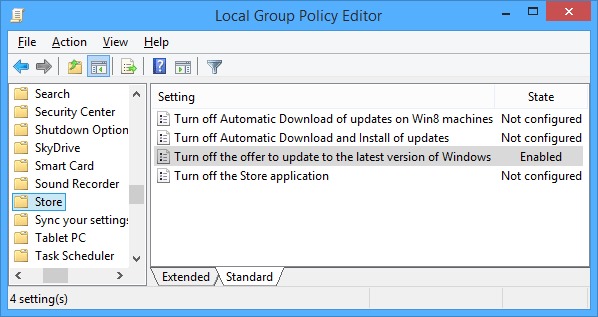
- In the set of settings, select Enabled, then click on Apply and OK (in order to restore the notification display, select the option Not Configured)
2. Through Registry Editor
- open Registry Editor (taste regedit in Run) navigated catre HKEY_LOCAL_MACHINESOFTWAREPoliciesMicrosoftWindowsStore (if that key does not exist CREATI-L MANUAL)
- In the right panel, create the DWORD input disableosuPdate and give it the value 1
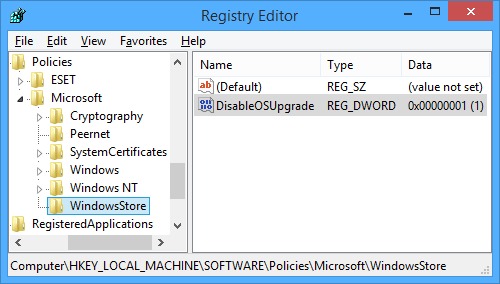
- Then close regeit and Restart Windows for the change to take effect (to restore the display of the notification, Delete the entrance created or give it the value 0)
Note: Before making changes in Group Policy editor or system registers, create a Point Restore to make sure you will not encounter any unpleasant consequences.
STEALTH SETTINGS – How to disable “Get Windows 8.1 for free” notification in Windows 8


You may also be interested in...
