


A tutorial in which you see step by step how you can recover all the ability of a flash drive. Recover USB Stick Full Capacity.
The scenario of the problem is next. You have a memorie USB (flash drive or USB stick) with a capacity of 8 GB, of which in the system you see no more available than a few MB. This is often the case, and USB stick formatting is not a solution by which to recover the entire storage space. It is storage space that apparently disappears simply.
In my case, I have a 8GB Kingston USB Memoria, of which in the system (Windows 10), I see only 199 MB of the total capacity. And of them are busy 10 MB, even if no file is stored on the USB stick.
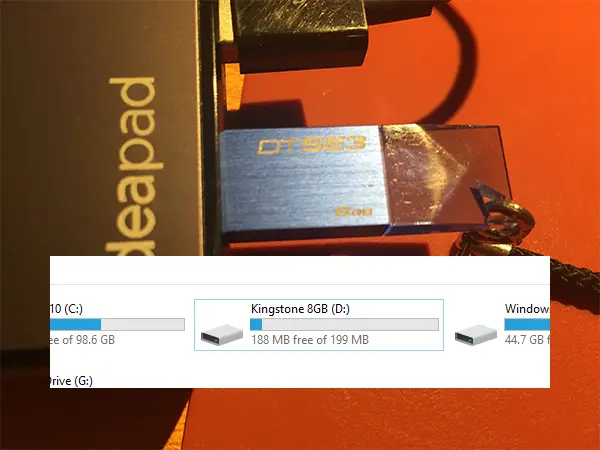
If I format This USB stick In the hope that I will succeed a recovery of the storage space (USB Stick full capacity) in any format (NTFS, FAT32, FAT), the result will be the same. Much of the real storage space will simply be disappeared.
The only solution to recover the missing storage space of a USB memory is a set of commands executed in Command Prompt.
Recover USB Stick Full Capacity. How can you recover all the ability of a flash drive?
To recover all the storage space of a flash drive, all you have to do is open Command promptly with administrator rights, then execute the orders below:
DISKPART
LIST DISK
Custom made “LIST DISK” shock units connected to the system will appear. Including the hard drive. Here we have to be a little careful, because in the next command we will select the flash drive whose storage space we need to recover. If by mistake we are going to select an external hard drive or the PC hard drive, We are in danger of losing all data.
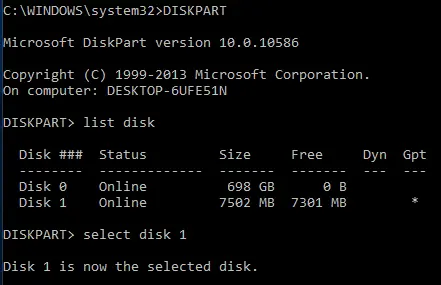
In my case, “Disk 1” is the drive for which I need to recover the storage space.
SELECT DISK 1
SELECT PARTITION 1
DELETE PARTITION
CREATE PARTITION PRIMARY
EXIT
Once these steps are completed, the entire storage capacity will be available again on the USB Flash Drive.
Related:
- Fix Hard Disk Partition Not Showing in Windows 11
- New Disk Cleanup in Windows 11 [2022 Tutorial]
- Task Manager in Windows 10 - details about CPU, RAM, Disk and Network
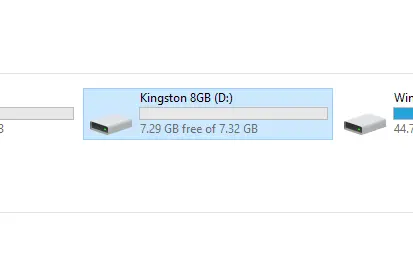
I do not know exactly what is the cause that leads to this disappearance of the storage space on Windows, but most likely appeared after repeated connections to MAC, Linux.


You may also be interested in...

3 thoughts on “Recover USB Stick Full Capacity. How can you recover all the ability of a flash drive?”
Hi, look what I suffered now when installing a Win 10 Pro taken from Microsoft.
I installed the windows and it goes great .. just that the problem is that I only have 2 50GB partitions each but my total hard has 1 tera…I can't get to give the other gigabaths to say so..I have tried your tutorial above..but you are not. If you can help me would be super…
Unfortunately I can't send you a picture…In short from 1 Hard I stayed with 100 GB..What is it to be done?
Cool man…Just write in Polish.
Hello
Thanks for the help of great review