

Most likely, most of the popular users messaging applications WhatsApp they already found out about the new one functionality added to it together with one of recent updates, namely voicemail. But just as likely there are still many who have not used this functionality and have no idea how to do it.
Voicemail FROM WhatsApp Allows its users to record short messages (without being necessary extensions or the intervention of other applications), which are then sent to those with whom they opened conversations during the recording of the respective messages. If you also use (at least occasionally) WhatsApp, but you have no idea if you have one installed version that allows sending voice messages, the easiest way to identify this is to check if the application displays icon of a microphone next to the field where the messages are written.
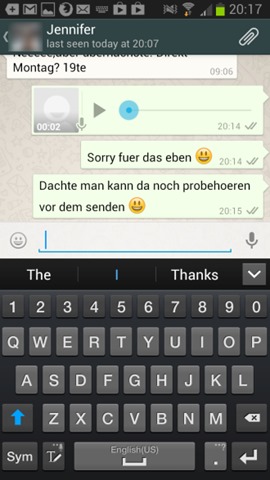
You can also check application version pressing the button menu of the smartphone or tablet (or by tapping the menu button of the application in page the start of it) and selecting Settings > About. In case WhatsApp version it is 2.10.222 or newer, means that you have installed a version that includes voice messaging functionality.

How do we use voicemail in WhatsApp?
- Open O conversation with the contact you want to send one to voice message
- Give Tap on microphone icon displayed next to the field where the messages are written and press and hold this
- your message is record so long as long as you hold the button with the microphone pressed
- when you lift your finger from the icon with the microphone, your message is sent the person with whom you have an open conversation. That simple.
Although there are enough users who would have preferred to be able to review the messages before sending them (they are sent immediately after they are registered, without the possibility to stop the shipment once the finger is removed from the microphone button), the possibility to send free and unlimited voice messages it is a welcome functionality that will definitely increase the popularity of WhatsApp and the number of users who will use this application.
STEALTH SETTINGS – How to send voice messages using WhatsApp


You may also be interested in...
