

One of the Windows 8 news, which Microsoft made it known even before Windows Build Conference in which he presented the preview of the new operating system, it is interface for file management (File Management), more precisely the way the commands will work Copy, Paste and Replace.
In Windows 7 and in previous operating systems, for each proces Copy/Paste appears one by one different dialogue, and in cases where we perform several such commands simultaneously, our monitor is filled with so many copy dialogs.
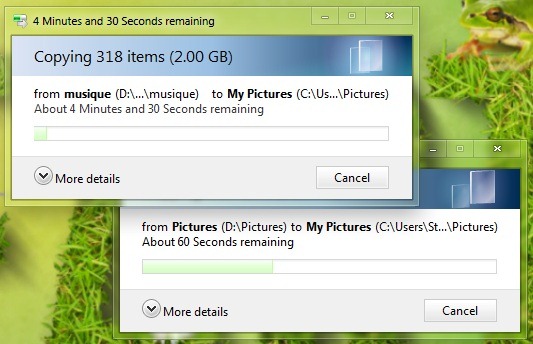
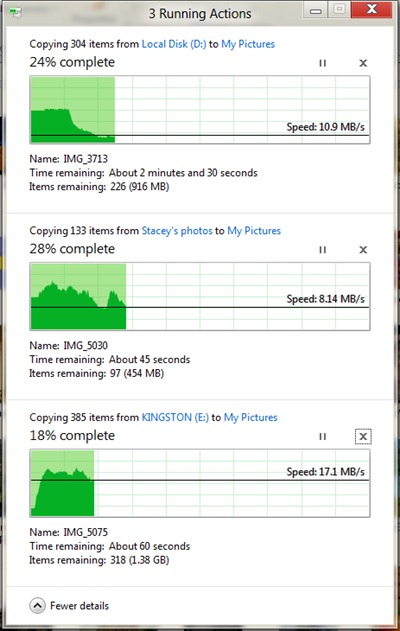
In Windows 8 all processes of copy/move files they will be displayed in a single dialog, on several "rows", thus avoiding screen clutter.
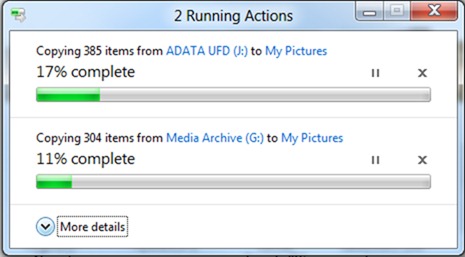
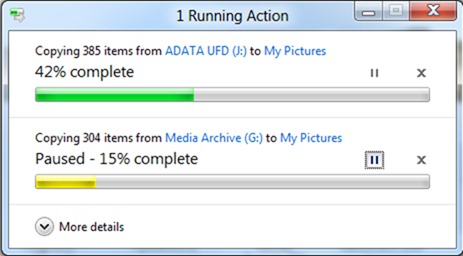
In addition, there will be the possibility of temporary stop (break) of some of the processes for a high transfer speed for the others (giving priority :D).
Even the mode of detailed display will differ in the Copy/Paste dialogs in Windows 8, this being in the form of CHARTS which allows the user to visualize which one it is speed and file transfer rate, as well as what is left to be transferred from them.
In terms of conflict dialogue that appears when the names of two files are identical, and it has been modified from the one we are used to in Windows Vista si Windows 7.
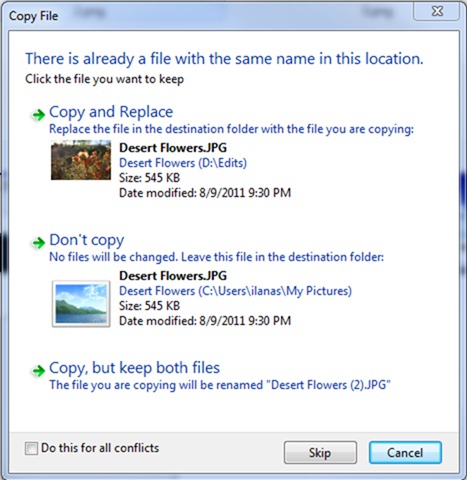
Instead of being asked if we want to we replace the files one with the other, if we want to keep both the new ones (that is, the ones to which we gave Paste in the folder) and the old ones (those already existing in the folder) or if we want to cancel the copy for certain files (or even for all), in Windows 8 all files will be displayed that come into conflict during a copy process, both the old and the new ones (displayed on two different columns), as well as Details about them, such as the folders they come from or their size or the dates they were on created/modified, and we will only have to check the files we want to keep (if we want to keep an old file and a new one with the same name, a number will be added to the new file, as it is now, before the end).
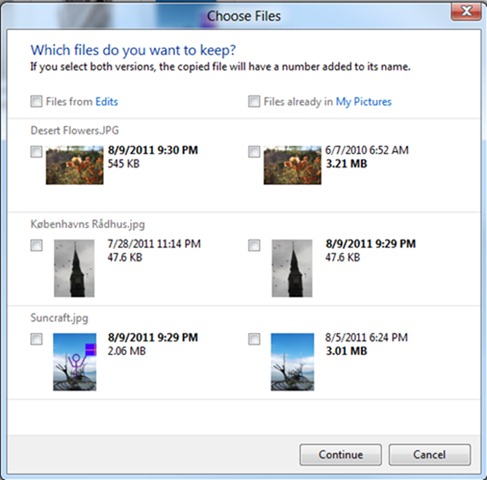
Also, the files in conflict can be opened by double-clicking on the thumbnails them displayed in the dialogue.
Instead of conclusion, we cannot fail to note that there is still plenty of time until the launch of the Windows 8 operating system feedback and suggestions, so we cannot know for sure if this is how the management of the files in RTM edition or if it will be more or less modified at the request of the users (or depending on the ideas of those from Microsoft).
STEALTH SETTINGS – The new File Management UI (Copy, Paste and Replace) in Windows 8


You may also be interested in...
