


One of the solutions the most common for solving a large number of problems cu systems the operare Windows it is bootarea them in Safe Mode, this being more precisely a mode of Diagnostics and reparation a system errors. In Previous versions of Windows, users can access Safe Mode (in the vast majority of cases) with the help of the key F8. In Windows 8 but where Boot menu has been completely modified, things are not quite the same anymore (in mod default, at least). so how can we access Safe Mode in Windows 8?
A way to boota in Safe Mode it is via the new boot menu. After starting the system, when the boot menu is displayed, select Advanced Startup Option > Troubleshoot > Advanced options.

In the displayed menu, select Startup Settings. Windows will ask you to Restore the system to activate more options, including bootarea in Safe Mode.
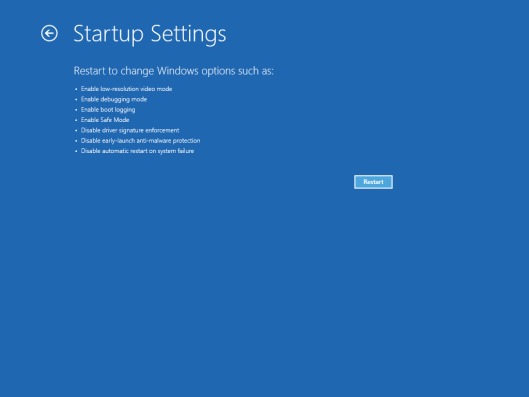
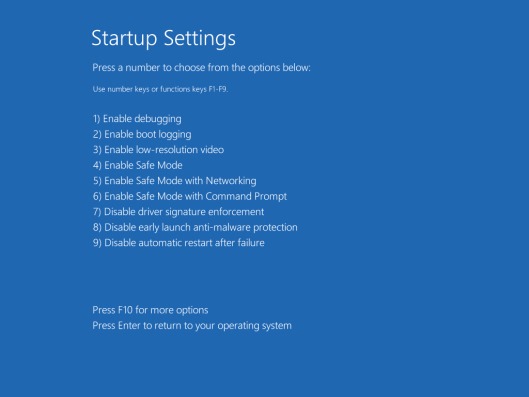
After restarting the system, a list of Startup options, which can be accessed via the function keys, from F1 the F9. To access Safe Mode type F4.
If accessing Safe Mode through the new boot menu seems too complicated, another way would be enabling the old boot menu with the help Command Prompt. open cmd cu Administrator privileges (otherwise don't solve anything) and type the command
bcdedit /set {default} bootmenupolicy legacy
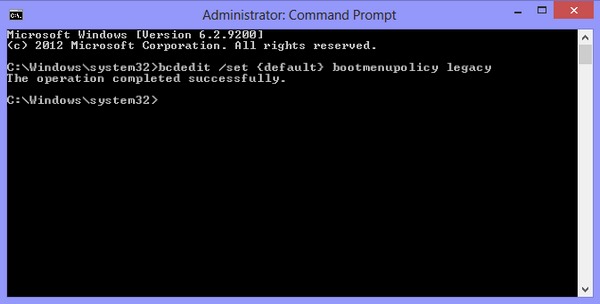
After the message The operation completed syccessfully is displayed, restart the system and press the F8 key to access it Safe Mode And others advanced boot options. If you want to activate the new boot menu again, open Command Prompt (also with administrator privileges) and type the command
bcdedit /set {default} bootmenupolicy standard
STEALTH SETTINGS – How to boot Windows 8 in Safe Mode


You may also be interested in...
