


If you are among those who are used to traveling often (or a lot) in company laptop from the endowment, surely you are also familiar with WiFi hotspots: whenever you "intersect" with a network wireless, the notification appears in the form of an asterisk in SYSTRAY (lower-right corner of the monitor). But in some cases, not all WiFi spots can be identified, especially when it comes to some undercover network (my case at the moment).
Wefi It's O application (+ Web service) that help users to identify all the WiFi networks in the locations in which they are - regardless of whether they are hidden or not – public or not – blocked or unverified – available in both versions freeware as well as in the variant premium (requires purchase of one LICENSES). As I am currently away and do not benefit from own internet connection, I decided to test this application myself, of course, the freeware version).
From my own experience, I can say that WiFi is quite useful (considering that I currently have access to internet – wireless), but the application comes bundled with some less attractive "tails". That is why it is necessary to pay more attention to its installation, in order to prevent the installation of a custom toolbar and one online shopping program, as well as the modification the search engine default (of course, in favor of a customized one).
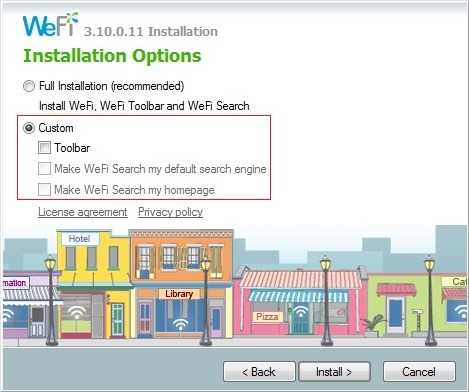 |  |
- during installation choose the option Custom Installation, then uncheck generous offers included (it is enough to uncheck the toolbar installation)
- then Install PriceGong and click on Next to continue the WeFi installation
Once installed (you can also skip the part with Registrations), the application will identify you wireless/WiFi networks available in the location where you and your laptop are at the moment.
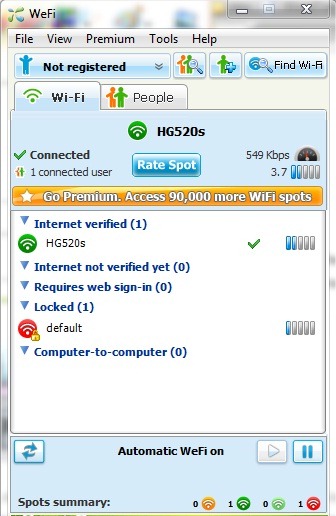
As can be seen in screenshot-ul above, in my case it gave results ;)
Note: Although it is not specified, WeFi is also compatible with Windows 7 (the application was tested by me on a Windows 7 Ultimate system, on 32 bits).


You may also be interested in...

7 thoughts on “Identify Wireless (WiFi) networks in the location with the help of Wefi”