

Bitlocker Det er en trekk inn gratis av Microsoft på operativsystemer Windows Vista, Windows 7 Endelig og Windows 7 Enterprise, for å beskytte dataene på Harddisk. Ved hjelp av BitLocker har vi muligheten til krypt (krypter hdd-stasjon) både systempartisjonen og datadelene på harddisken, men for å gjøre dette trenger vi Trusted Platform Module (TPM). Ikke alle datamaskiner/bærbare datamaskiner har dette TPM integrert, og når vi ønsker å aktivere BitLocker for en partisjon, vises meldingen:
 En kompatibel TPM-sikkerhetsenhet (Trusted Platform Module) må være til stede på denne datamaskinen, men en TPM ble ikke funnet. Kontakt systemadministratoren din for å aktivere BitLocker.
Hvordan kan vi bruke BitLocker hvis vi ikke har Trusted Platform Module (TPM).
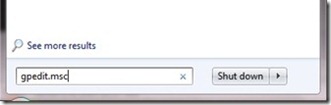
1. Deschidem Local Group Policy Editor. (løp – Gpedit.msc eller type “Gpedit.msc” i Søk etter programmer og filer (Startmeny))
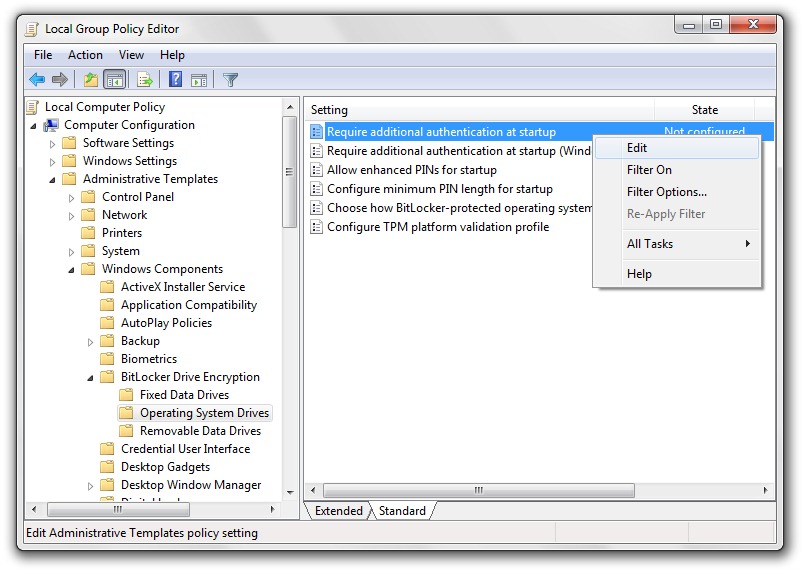
2. I Local Policy Group mergem la Datakonfigurasjon > Administrative maler > Windows -komponenter > Bit Locker Drive Encryption > Operativsystemstasjoner og høyreklikk & Rediger (eller dobbeltklikk) på Krev ekstra autentisering ved oppstart.
3. Bifam “Aktiver” foran Krev ekstra autentisering ved oppstart og vi sørger for at det er merket av og boksen fra Tillat BitLocker uten en kompatibel TPM.
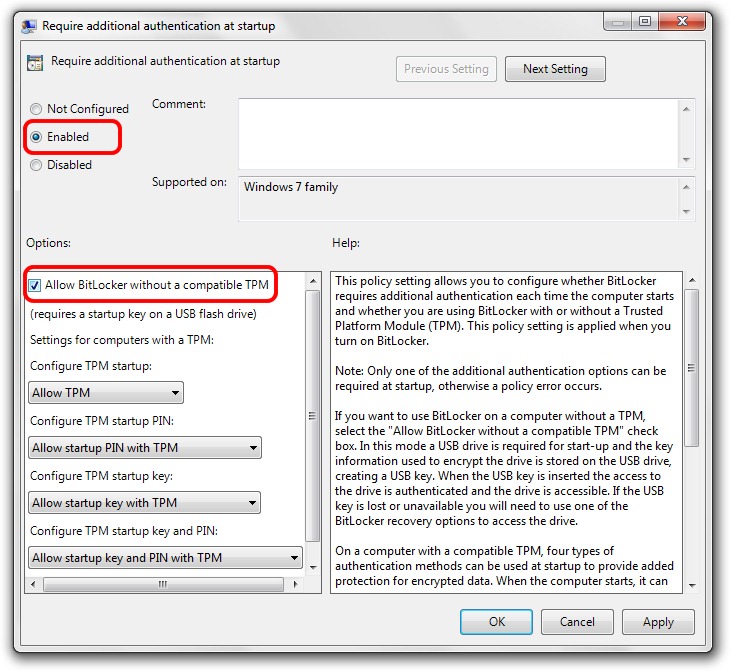
4. Søke & Ok & Start datamaskinen på nytt.


Du kan også være interessert i...

En tenkte på “Hvordan kan vi bruke Bitlocker uten pålitelige plattformmoduler (TPM)”