

Those who use gadgets Windows 7, probably discovered (no enthusiasm, I guess) as when UAC It is disabled, those gadgets disappear from the desktop.
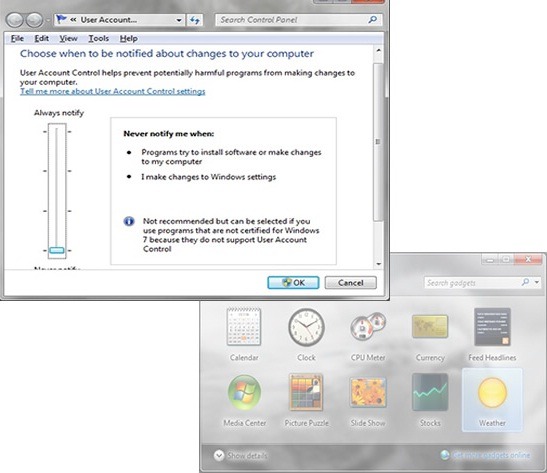
Exist three solutions To solve this problem: either let the UAC do its guard duty (which is recommended, considering that there are also viruses that are shattering antivirus) and enjoy a desktop loaded with temperatures, pictures or calendars; Either you give up the UAC and adopt the style of the clean desktop (recommended for aesthetic reasons and other subjective reasons: P); or put your hand on the hammer and nicovala and walk at Registry Editor.
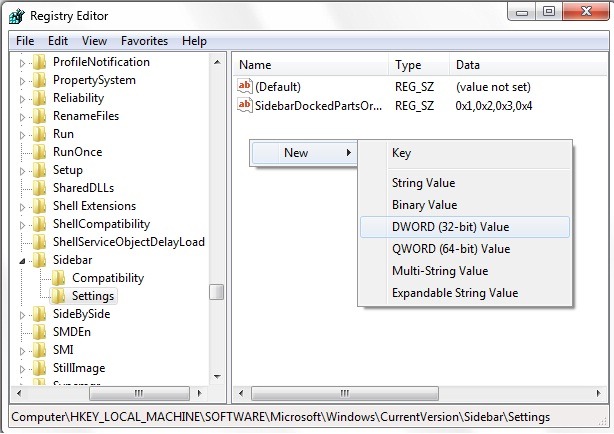
In Searchthe from Start Menu taste regedit And give Enter. In Registry Editor Follow the Way HKEY_LOCAL_MACHINESOFTWAREMicrosoftWindowsCurrentVersionSidebarSettings. In the panel on the right side create the entrance AllowElevatedProcess (Dword), double-click on it and change its value in 1.
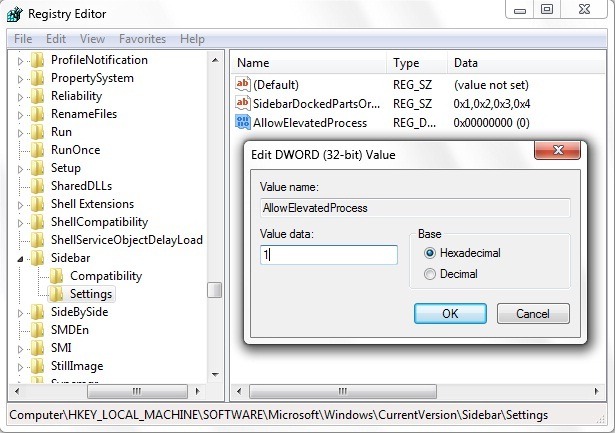
After the restart, you will be able to disable the UAC without risk that a gadget will disappear from the flock.


You may also be interested in...

One thought on “Windows 7 Tricks: Fix incompatibility between UAC and Windows Gadgets”