

In certain cases, users Windows I can see that firewall-ul native of Sistema it doesn't work properly. In fact, most likely, the system will display a warning message How Windows Firewall either it has been stopped or it is showing functionality errors (in most cases, this happens when the system is infected or are used security programs which are not compatible with Windows Firewall). Other times, users have manually configure the firewall settings, and after a certain time I want to return to Default settings its.
If you are a user Windows 8 or Windows 8.1 And you want to reset Windows Firewall to default settings, whatever the reason, the instructions below will help you.
How do we restore the default settings for Windows firewall in Windows 8.1?
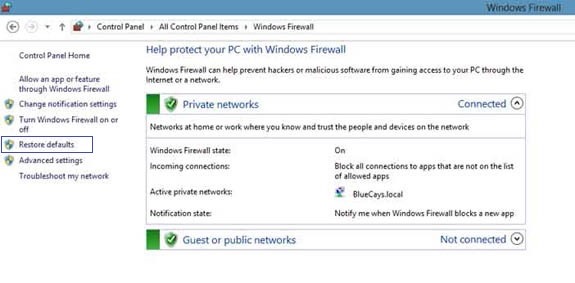
- open Control Panel (taste control.exe in Run) and click on System and Security > Windows Firewall
- in the left panel, click on the option Restore defaults
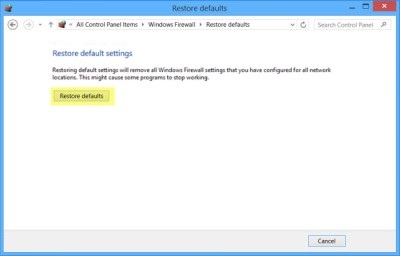
- in the opened window, click again on Restore defaults, then confirm by clicking on the button Yes
You can also reset the settings for Windows Firewall through Command Prompt, using the command line netsh advfirewall reset (for detailed information about what this command does, type in cmd netsh advfirewall ?). When the operation is complete, the Command Prompt will display the message OK.
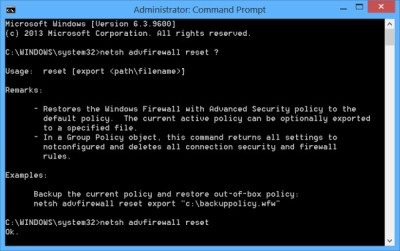
The order will restore the policy Windows Firewall cu Advanced Security the Default settings and it will delete everything security connections and firewall rules set by the user.
Note: Tutorial also valid for Windows 7.
STEALTH SETTINGS – How to reset Windows Firewaal to its default settings in Windows 8/8.1


You may also be interested in...

One thought on “How can we reset Windows Firewall at Default settings in Windows 8/8.1”