
Skip to navigation Skip to main content
Stealth Settings
Menu
Stealth Settings
  • Home
  • Windows
  • macOS
  • Linux
  • Office
  • WordPress
  • AI
May 3, 2021 On October 8, 2011

by

Posted by Stealth
0

How to limit children's access to computer with parental control in Windows 7

Microsoft, Noteworthy, Tweaks & Hacks, Windows 7, Windows How-To

How to limit children's access to computer with parental control in Windows 7

Posted by author-avatar Stealth
May 3, 2021 On October 8, 2011
0

As you probably noticed the computer has become a basic component in the house, most families, and children are often the main beneficiaries of these technological wonders that became from a luxury object in the 2000s, in a trivial one. In the following we present some ways to limit (that we cannot completely prohibit) the access of children to this means of communication, fun and sometimes even study.
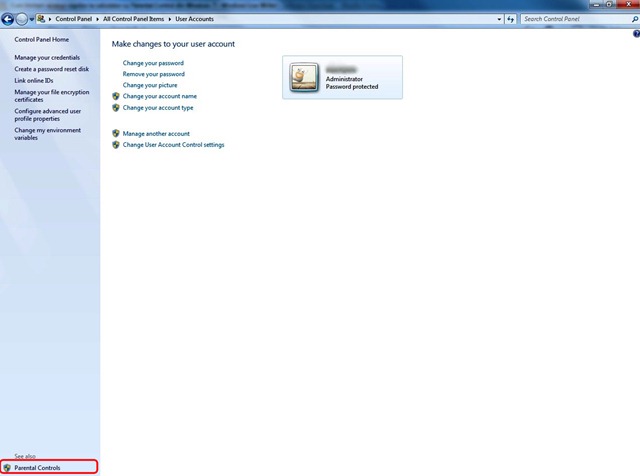
User Acounts

The function Control parental that you can access from Control Panel > User Accounts in the lower left part, it gives you the possibility after you have defined a junior user to limit his access to the computer and or access to certain applications in several ways, games, etc.
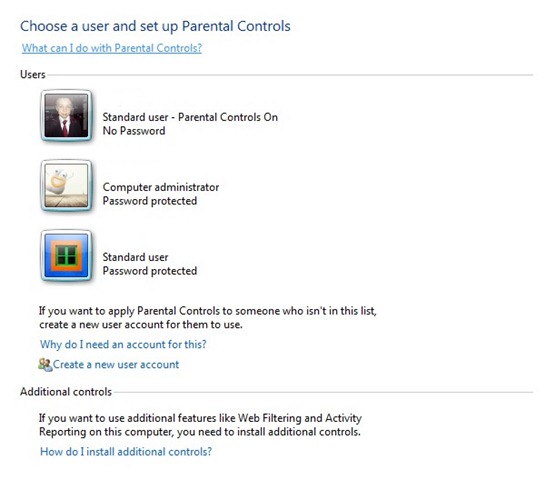
Parental Controls

In order to have the effect of the Parental Controls function, the other users in the family will have to have protected access with a password.
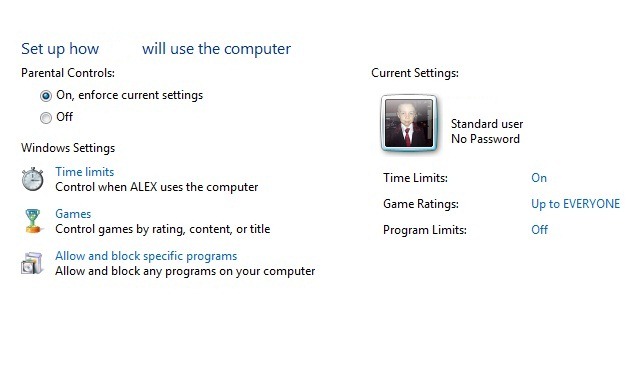
Parental Controls User

 Parental control It gives you the opportunity to establish a small user an access program to the computer selecting the option Time Limits, You can limit access to games that do not fit into its age group from the option Games And you can limit their access to certain programs installed in the computer with the option Alow and block specific programs.

From the window Time Limits You can select with the mouse the time interval in which the small user can access the computer for each day of the week and you can change them whenever needed.
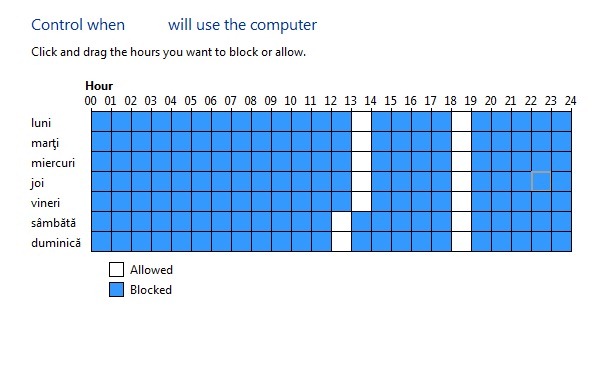
Time Limits

With the option Games You can filter games that are not dedicated to their age (Games Restriction) but they were not framed (Games Controls) in the criteria it has Windows Or you can block total access to games.
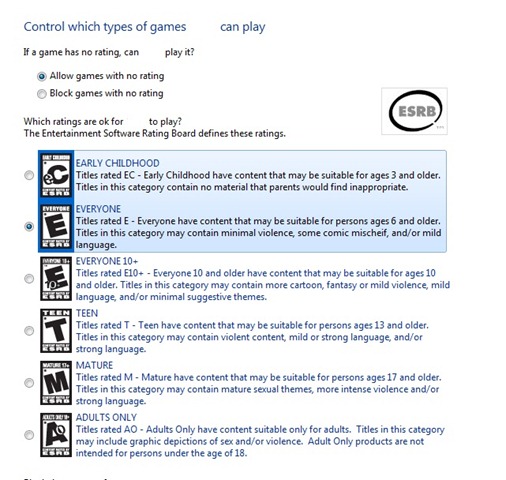
Games Restriction

last option, Alow and block specific programs, will allow you to limit the junior access to certain installed programs or games that have not been classified in Games Controls. Also here you can check other criteria for blocking the access of juniors to applications that contain scenes images regarding violence, insulting language, blood, alcohol, drugs, etc.

We hope that this article was useful to you and so small users were protected by excess use of the computer.

How to limit children's access to computer with parental control in Windows 7

What’s New

  • Enable preview of PDF, Excel, or Word files in Windows 11 - (Preview Pane)
    Enable preview for PDF, Excel, or Word files in Windows 11 – (Preview Pane)
    December 24, 2025
  • Windows 11 Build 27823 - Top Cards
    What's new in Windows 11 Build 27823. Top Cards.
    March 27, 2025
  • Google Analytics
    How to remove _gl and _ga parameters from a website's URLs.
    March 25, 2025
  • Google Core Update SEO - March 2025
    Sudden drop in organic traffic on the site in March 2025? Google Search Core Update
    March 23, 2025
  • How to configure Fail2Ban for WordPress (wp-login, xmlrpc)
    How to configure Fail2Ban for WordPress (wp-login, xmlrpc)
    March 17, 2025
  • GPT-4.5
    What's new in GPT-4.5? The most powerful ChatGPT model.
    March 2, 2025
control panel settingsMicrosoft Windows Download & Tipsuser accessUser Account ControlWindows 7windows tip
Microsoft, Noteworthy, Tweaks & Hacks, Windows 7, Windows How-To
Newer
How we wrote a letter of intent
Back to list
Older How do you create a successful CV? 10 quality standards
author-avatar

About Stealth

Passionate about technology, I write with pleasure on stealthsetts.com starting with 2006. I have a rich experience in operating systems: Macos, Windows and Linux, but also in programming languages ​​and blogging platforms (WordPress) and for online stores (WooCommerce, Magento, Presashop).

View all posts by Stealth

You may also be interested in...

Kiosk Mode in Windows 11 - Single App Access
15 Mar

Kiosk mode in Windows 11 – User with limited access

Kiosk mode in Windows 11 is one of the least known features, but very useful in many scenarios. Through Kiosk you can...
Continue reading
Windows 7
14 Jan

Microsoft has stopped updates for Windows 7

2023 Update: Microsoft has stopped updates for Windows 7 as of January 14, 2023. As of April 2023, only 3.78% of ...
Continue reading
07 May

How we solve the BSOD error (Blue Screen) Driver_irql_not_ Less_or_equal on Windows 10

Sistemele de operare Windows au cea mai mare acoperire pe calculatoarele din intreaga lume. Si tot cea mai mare "acoperire" o au si atu...
Continue reading
Windows Upgrade
23 Jan

How can you upgrade free to Windows 10 or Windows 11

Starting with January 20, 2020, Microsoft decided to stop support for security updates (security patches) of Wind...
Continue reading
22 Jan

Windows 7: Security updates by 2020 (Security Patches)

If you are a Windows 7 user and fan, we have bad news. Starting January 20, 2020, Microsoft will no longer release updates ...
Continue reading
04 Sep

How do we protect our Windows PC ransomware by deactivating SMBV1

As has been discussed before and is very clearly known, the WannaCry and Petya ransomware viruses could not cause damage on such a scale...
Continue reading
20 Mar

Your searches might be slow because the index is not running [Windows Features Tip]

When we have to search for various pictures, movies or documents in Windows PC, the most handy is the dedicated search bar. Search. Somewhere in...
Continue reading
How to rename multiple files (pictures, documents) simultaneously - macOS / Windows
12 May

MPSigStub.exe – What is it and how can it be erased?

Many Windows 10 or Windows 7 users complain about the presence of a suspicious folder with a strange name, which contains an e...
Continue reading
07 Apr

How can we turn off the notification of upgrade to Windows 10 in Windows 7 and Windows 8

For several days, Microsoft has been forcing the upgrade of the old Windows 7 and Windows 8 operating systems to the new Windows 10. It would have been no...
Continue reading
04 Apr

How can we block the automatic installation / upgrade from Windows 7, Windows 8 or Windows 8.1 to Windows 10

In urma cu aproximativ trei saptamani, Microsoft a schimbat statusul de upgrade la Windows 10, din "optional" in "recomandat". Acest lu...
Continue reading
05 May

Now you can download Microsoft Office 2016 Public Preview!

In March of this year, Microsoft announced that the Office 2016 application suite is available for testing in the business environment...
Continue reading
10 Apr

Redstone, Windows 10's descendant, will be launched in 2016

Windows 10 has not even reached the market in a final version and we are already hearing speculations about the next major version of the system...
Continue reading

Leave a Reply Cancel reply

Your email address will not be published. Required fields are marked *

© 2025 Stealth SettingsTutorials and news from information technology.
RomânăEnglishFrançaisDeutschItalianoEspañolPortuguês日本語한국어Lietuvių kalbaNorskNederlandsPolskiDanskSuomiEesti keelLatviešu valodaБългарскиУкраїнськаSvenskaČeština
Privacy policy | About cookies | Contact | About us
  • Home
  • Windows
  • macOS
  • Linux
  • Office
  • WordPress
  • AI